The Typist’s Dilemma: Mechanical Keyboard vs Membrane Keyboard
In a day and age when written communication reigns supreme, our unspoken choice of keyboard – the unsung hero beneath our fingertips – significantly impacts our efficiency and comfort level.
Enter two popular contenders in the typing field: the mechanical keyboard and the membrane keyboard.
These technological marvels may seem indistinguishable to the casual observer, but there are stark differences lying beneath their keys.
Understanding the Keyboard Structure
The keyboard is an integral part of our digital interaction.
It’s like the unsung symphony of our digital communication—remaining inconspicuous, yet significant.
Its internal structure resonates with our typing speed, accuracy, and comfort.
To appreciate the omnipresence of the keyboard, we need to fathom its two primary structures: the mechanical keyboard and the membrane keyboard.
Mechanical keyboards, gaining repute among gamers and typists, boast an individual mechanical switch beneath each key.
These switches, designed with a coil spring underneath, register key presses via physical and audible feedback.
Conversely, membrane keyboards work on electrical conductance, where pressing a key closes the circuit between two membrane layers to register the keystroke.
Unveiling the Ghosting Effect and N-key Rollover
A distinguishing factor that separates mechanical keyboards from their membrane counterparts is how they handle simultaneous keystrokes.
In gaming or fast typing scenarios, multiple keys need to be registered simultaneously.
Mechanical keyboards shine here with their ‘N-key rollover’ feature, enabling them to register more simultaneous keystrokes than membrane keyboards, which can suffer from a ‘ghosting’ effect where their circuit-based design can fail to register multiple pressed keys at once.
Tapping into the Sensory Experience
The difference extends beyond functionality to influence our sensory experiences as well.
The ‘clicky’ sound of a mechanical keyboard, the tangible feedback from each keystroke has an almost therapeutic effect on some.
Others prefer a quieter work environment, facilitated by the silent operation of membrane keyboards.
Additionally, the harder key resistance of mechanical keyboards aids in reducing accidental keystrokes, making them a potential ally in typing accuracy.
Analyzing Lifespan and Durability
Mechanical keyboards live longer – often rated to withstand tens of millions of keystrokes, dwarfing the lifespan of membrane keyboards.
While the firm structure and high-quality build of mechanical keyboards make them more expensive, their durability can be a cost-effective advantage over time.
However, the lightweight and compact nature of membrane keyboards make them easier to transport, adding a layer of convenience to their less robust construction.
Considering Ease of Maintenance
Lastly, mechanical keyboards score high in maintenance.
Thanks to their individual key-switches, cleaning and replacing keys becomes significantly easier.
In contrast, membrane keyboards often necessitate replacement as entire units once a key fails or when dirt impairs performance.
The humble keyboard, unheeded yet integral, stands as a testament to our overwhelming reliance
The Inner Workings: Understanding Mechanical and Membrane Keyboards
The heart of any keyboard lies in its switches.
These intricate mechanisms conjure up the digital characters on our screens when we press a key.
The Anatomy of a Key Switch
To be more precise, the function of a keyboard and its ability to translate a key press into a digital response is determined by the switch that adheres beneath each key.
The switch, in simpler terms, is what lays between the user typing on the keyboard and the circuit board that processes the resulting input.
The Mechanics of a Switch
Each time a key is pressed, the switch beneath the key triggers an electrical signal that corresponds with a specific character or function.
This signal then journeys to the computer which interprets it and displays the appropriate character on the screen.
Imagine typing the letter “A” on your keyboard.
The switch beneath the key is engaged on the press, sending an electronic signal representing “A” to the computer.
This information is then transformed into visual data, displaying the character on your screen.
Types of Key Switches
Key switches, not all made the same, can be broadly classified into two types: mechanical and membrane.
Mechanical switches, the quintessential typing device, are robust, featuring a spring-loaded sliding keypost beneath each key.
Each of these switches, due to their design, gives a unique ‘click’ sound on each keypress, providing the user with both auditory and tactile feedback.
The specific arrangement of parts within a mechanical switch also means that it stands a much longer lifespan, hence being the popular choice among professionals and typists.
In contrast, membrane keyboards employ a completely different technology.
They use three different layers in their design.
The top and bottom layers are what we call the ‘membrane’ — a flexible plastic that creates an electrical circuit when pressed.
Between these top and bottom layers is a spacer that prevents the circuit from being made until a key is pressed.
When you type on a membrane keyboard, you’re essentially pushing through this spacer to create a direct connection between the top and bottom membrane layers — leading to a signal being sent out.
Even though these keyboards are less tactile and quieter than their mechanical counterparts, they have gained popularity due to their cost-effectiveness.
This understanding of the main components of a keyboard and how they operate transforms the simple act of typing on a keyboard into a fascinating exploration of technology at work.
The next time you sit to type, you might see your keyboard in a whole new light, appreciating the marvel of engineering that goes into every keystroke.
The Intersection of Design and User Experience
Whether you prefer the sturdy feedback of a mechanical switch, or
Mechanical Keyboards: Feeling the Click
Mechanical keyboards use independent mechanical switches for each key, which comprise a base, a spring, and a stem.
When you press a key, you compress the spring through the stem, causing a noticeable tactile “click.”
The Anatomy of a Mechanical Keyboard Switch
Recommended to our readers: Click here
The heart of a mechanical keyboard lies within its key switches.
Unlike other types of keyboards, the switches on mechanical keyboards are made up of individual, independently functioning components.
Each key consists of three main parts: a base, a spring, and a stem.
The base forms the foundation of the key and is usually attached to the keyboard’s circuit board.
The spring is contained within the base, with its role being to provide the necessary resistance when a key is pressed.
It’s this resistance that helps to determine the amount of force required to register a key press.
Recommended to our readers: Click here
The stem is the moving part of the key that you press.
When a key is pressed, the stem pushes against the spring, causing the spring to compress.
Once the spring reaches a certain compression point, it causes the key to “click” and sends a signal to the keyboard’s circuit board to register the key press.
Advantages of Mechanical Keyboards: The Tactile “Click”
Many users prefer mechanical keyboards over other types for their tactile and audible feedback.
When you press a key on a mechanical keyboard, the compression of the spring through the stem creates a specific tactile feeling.
This is often accompanied by a clicking sound, which varies based on the specific type of mechanical switch used.
For example, Blue switches, one of the most commonly used mechanical switches, are well-known for their distinct clicky and tactile feel.
On the other hand, the Red switches are linear and silent, providing a smooth keystroke without the tactile bump or the clicking sound.
Practical Application and User Preferences
The audible click and tactile bump can give the user a real sense of engagement with their activity, whether it’s typing, programming, or gaming.
Thus, different users might prefer different kinds of mechanical switches.
Programmers who need to type for long periods may prefer a keyboard with a tactile but quiet switch, like the Brown switch.
Gamers, however, might lean towards faster switches like the Red or Black switches, that have swift actuation points for quick key presses.
In a nutshell, the unique construction of mechanical keyboards, combined with the variety of switch types available, make them a popular choice for various users.
They offer a customizable user experience that cater to different needs and preferences that are difficult to achieve with traditional membrane or rubber dome keyboards.
Membrane Keyboards: Smooth and Silent
Contrastingly, membrane keyboards function quite differently.
They sport a completely different design, employing a pressure pad system where a rubber dome or membrane layer sits beneath each key.
A keypress forces the dome or layer to collapse, creating an electrical circuit that signals the corresponding character to your computer.
Understanding the functioning of Membrane Keyboards
While the mechanism of a membrane keyboard might sound intricate, its actual operation is straightforward.
Upon pressing a key, the underlying silicone dome or membrane layer is compressed, causing them to make direct contact with the circuit board underneath.
This direct contact, resulting from the depression of the rubber dome, is immediately logged as a particular keystroke by the keyboard’s processing unit.
The electrical circuit formed by this action doesn’t just signal the computer; it activates the key operation with the corresponding character.
When the pressure is released, the silicone dome returns to its original state, causing the circuit to break and allowing the keyboard to register subsequent keystrokes.
Interestingly, the processors in these keyboards are sophisticated enough to detect simultaneous keystrokes.
Thus, membrane keyboards support multiple inputs, a feature known as ‘key rollover’.
This makes membrane keyboards ideal for gamers who need to press several keys at once.
The Design Advantage of Membrane Keyboards
The layer-by-layer design of membrane keyboards offers a significantly slim profile compared to mechanical keyboards.
This feature makes membrane keyboards a preferred choice for those who prioritize portability and less cluttered workstation setups.
The smooth and compact design of these keyboards not only makes them travel-friendly but also provides a consistent keypress experience.
Distinctive User Experience
Because the keys on a membrane keyboard are pressure sensitive, the typing feel is quite different from that of a mechanical keyboard.
There is no tactile bump or audible click to indicate a successful keypress.
Instead, users often cite a ‘mushy’ feeling due to the underlying rubber domes, which could take some getting used to, especially for those transitioning from mechanical keyboards.
Additionally, membrane keyboards tend to be significantly quieter, a characteristic preferred by those working in quiet environments or sharing workspaces where others may be distracted by audible keystrokes.
Furthermore, the lack of physical gaps between the keys makes these keyboards resistant to dust and liquid infiltration, making them an excellent choice for durability.
In conclusion, a membrane keyboard offers a unique blend of functionality, design aesthetics, and user experience.
Despite the potential learning curve, many users find the benefits of a quieter, sleeker keyboard outweigh the initial adjustment period.
A Question of Comfort: Typing Experiences
Comparing mechanical and membrane keyboards is reminiscent of comparing a vintage typewriter to a sleek tablet.
Both have their charms, and it ultimately comes down to personal preference.
Mechanical Keyboards: A Tactile Encounter
Mechanical keyboards, akin to vintage typewriters, offer an unmistakable typing experience with a tactile and auditory feedback unique to their style.
Each key is equipped with its mechanical switch, and the force exerted on these switches results in a satisfying ‘click’ sound.
The auditory and sensory interaction often convinces many users of the superiority of this type of keyboard, likening the experience to playing a fine instrument.
Professional typists and gaming enthusiasts often gravitate towards mechanical keyboards for this very reason.
These keyboards are designed to accurately recognize input even during rapid key presses, resulting in faster typing speeds and better gaming performance.
Membrane Keyboards: The Sleek Minimalists
In contrast, membrane keyboards are the sleek tablets of the typing world.
Silent, slim, and lightweight, they represent the high-tech and portable side of the sector.
Recommended to our readers: Click here
Each keystroke on a membrane keyboard is relatively quiet, with a softer and more muted feedback than its mechanical counterpart.
This arguably makes for a smoother typing experience, with less force required for each keystroke.
Moreover, membrane keyboards are less expensive, more resistant to dirt and dust, and are often preferred for their slim design.
For instance, laptops, due to their need for compactness, extensively use this type of keyboard.
Typing Experiences: It’s a Personal Call
While some typists consider the mechanical keyboard’s loud clicks as affirmations of productivity, others might see them as a disturbance, much preferring the understated elegance of a membrane keyboard.
Similarly, the physical feedback from each key can be invigorating for one user, yet tiring for another.
Ultimately, the choice between mechanical and membrane keyboards echoes larger debates around aesthetics, practicality, and the blend between old and new.
Both types of keyboards have unique advantages depending on the user’s needs and preferences.
A gamer might desire the tactile feedback of a mechanical keyboard, while a writer might appreciate the quiet and gentle touch of a membrane one.
In summary, the relative importance of the factors listed above will differ from one person to another, making the ‘best’ typing experience highly subjective.
As is often the case with technology, personal preference plays a decisive role in dictating choice.
A World of Feedback: Mechanical Keyboards
The unmistakable click-clack of mechanical keyboards provides satisfying tactile and auditory feedback.
Such feedback can be advantageous, especially for discerning typists who enjoy the sensation and acoustic reverberation indicating a successful keypress.
The Alluring Charm of Tactile Feedback
Mechanical keyboards possess an undeniable appeal rooted in the intricate art of communication.
The tactile feedback they offer ranks among their most unique advantages.
The instant physical confirmation immediately notifies the user that the press has been recorded, making typing a more interactive experience.
This feedback is particularly useful for touch typists who rely on their senses rather than the visuals on the screen to know they’ve made the correct input.
The Symphony of Auditory Cues
Beyond the tactile benefits, the sound that a mechanical keyboard produces —often referred to as the “click-clack”— is a symphony of auditory cues which is deeply appreciated by many users.
Mechanical keyboards are designed to produce a distinct sound that becomes rhythmic with consistent use.
This acoustic feedback, much like the tactile feedback, also serves as an indicator of successful keypresses.
For certain users, this sound is not merely functional but also adds to the overall aesthetic appeal of these keyboards and can help to enhance typing speed and accuracy.
The Art of Customizability
What makes mechanical keyboards stand out even more is the amplitude of customizability they offer.
For instance, swapping in lighter key switches can result in a softer click and a catchier rebound, thus allowing for faster typing.
On the other hand, choosing heavier switches provides slower, more solid presses with a deeper, more resonant ‘clack’.
Thus, a user can adjust their mechanical keyboard to suit their preference for both touch and sound.
Influencing Productivity
The tactile and auditory feedback of mechanical keyboards often enhance productivity as they serve as a constant reminder of progress.
The physical and auditory affirmation of each input subconsciously encourages users to keep typing.
Many users report higher typing speeds and lower error rates when using mechanical keyboards, showing that the benefits of tactile and auditory feedback extend beyond just personal preference.
Community and Cult Following
Mechanical keyboards have grown a passionate community of developers, users, and hobbyists on internet forums and social media.
Each keyboard’s keystrokes’ tactile and auditory feedback, along with the capacity for customization, make each one distinct.
These subtle details differentiate mechanical keyboards from one another, giving them a discerning personality in a market saturated with nearly identical-looking membrane keyboards.
This difference has fueled a cult following and dedicated the mechanical keyboard community to exploring and discussing nuances in tactile and auditory feedback across different kinds of mechanical keyboard models and makes.
Keeping It Under Key: Membrane Keyboards
On the other hand, membrane keyboards are virtually silent, their soft keystrokes not giving away your activity level.
They require less force to actuate each key, providing a softer typing experience that can be easier on the fingertips.
The Power of Silence
It is no secret that in the arena of keyboards, membrane technologies often win the race when it comes to the noise factor.
Unlike their mechanical counterparts, membrane keyboards operate at near silence.
This is due to their unique design that lacks dedicated switches for each key, meaning every time you press a key, the noise generated is significantly lower.
This can be exceptionally beneficial in communal environments or workspaces, such as libraries, offices, or late-night gaming sessions, where the rhythmic tapping of a mechanical keyboard may be considered disruptive or frustrate co-workers or roommates.
Elevated Experience
Besides their quiet operations, membrane keyboards also claim fame for their gentle, low-force actuation.
This refers to the amount of pressure needed to press each key.
With less force required, this can lead to a more comfortable, less fatiguing typing experience.
Users can type for extended periods without experiencing the same level of fatigue that might be felt when using a mechanical keyboard, which typically requires more force per keystroke.
The Mechanic Behind: Underlying Technology
Yet, the comfort of membrane keyboards is not merely due to mechanical aspects but is deeply rooted in their technology.
The name ‘membrane’ comes from the thin, flexible layer that sits beneath the keys.
When a key is pressed, it pushes down on this layer and creates a circuit, registering the keystroke.
This design not only reduces noise and the force required but also allows for a thinner, more compact keyboard design.
The Beneficiaries: Applicability Across Professions
This tech isn’t only for the coders or writers aiming for a more comfortable typing experience–it’s also beneficial for professional gamers who engage in prolonged gaming sessions.
Subtle keystrokes allow for quick actions without the distracting and potentially action-limiting clatter produced by other keyboard types.
Minimalist designers may also appreciate the sleek aesthetic offered by membrane keyboards, alongside their compact and thin design, which can complement a tidy workspace design.
Though they may lack the tactile feedback and the definitive ‘click’ that some typists and gamers prefer, the unique characteristics of membrane keyboards– their near silence and low force actuation– make them an attractive choice for a wide range of users.
With their potential for quieter operation, enhanced comfort, and contemporary design, it may be clear why many consider them an appealing alternative to the traditional mechanical keyboard.

Comparing Longevity: Which Lasts Longer?
When considering the lifespan of mechanical vs.
membrane keyboards, we’re essentially comparing a resilient old-timer to an economic sprinter.
The Resilient Old-Timer: Mechanical Keyboards
Mechanical keyboards, often touted as the “resilient old-timers”, are known for their durable construction that withstands numerous keystrokes over an extended period.
The keys of a mechanical keyboard consist of individual switches under each keycap, leading to longer-lasting performance and reliability.
This feature makes them a preferred choice amongst professional gamers and writers who press keys millions of times over the course of a keyboard’s life.
With most models, mechanical keyboards are rated for upwards of 50 million keypresses, far exceeding their membrane counterparts.
Cherry MX, a popular brand in mechanical keyboards, exemplifies this longevity aspect.
Known for its usage by professional gamers, it continues to dominate the market due to its lasting build.
Despite their higher upfront costs, mechanical keyboards, with their longevity and robust performance, offer excellent value for money on a long-term basis.
The Economic Sprinter: Membrane Keyboards
On the other hand, we have membrane keyboards, the so-called “economic sprinters” of the keyboard world.
These keyboards come at a lower initial cost, making them attractive to budget-conscious customers and large offices requiring bulk purchases.
Recommended to our readers: Click here
The structure of a membrane keyboard involves pressure pads that lay beneath the keys, significantly reducing the components required and thus, the overall cost.
However, this cost-effectiveness comes with an expense of lifespan.
Generally, most membrane keyboards are rated for up to 5-10 million keystrokes, meaning they typically wear out five to ten times faster compared to mechanical keyboards.
Well-known brands like Logitech and HP offer a wide range of membrane keyboards that are competitively priced, albeit with a shorter lifespan.
The Bottom Line: Lifespan vs. Cost
Ultimately, the choice between “resilient old-timer” mechanical keyboards and “economic sprinter” membrane keyboards boils down to personal requirements and preferences.
The former shines in the arena of longevity and robustness, making it a perfect choice for heavy usage scenarios.
However, the latter holds its ground when cost-effectiveness is a key deciding factor.
Buyers need to weigh the initial cost against the potential need for more frequent replacement if they opt for the cheaper, less durable membrane keyboards, considering the total cost of ownership.
The comparison thus brings to light the delicate balance between the economy of upfront cost and long-term durability – a trade-off that every keyboard user must evaluate based on their particular needs and usage habits.
Mechanical Longevity:Built to Last
Mechanical keyboards often boast a lifespan of 50 to 70 million keypresses—extending their operational life significantly compared to their membrane counterparts.
Their robust build often justifies their higher price tag.
The Science behind The Lifespan
Mechanical keyboards are renowned for their longevity, a factor primarily attributed to their unique configuration.
Unlike membrane keyboards that consist of thin silicon layers, they incorporate individual mechanical switches under each keycap.
These switches are designed to withstand the wear and tear of aggressive typing, contributing to an impressive lifespan of up to 70 million keypresses.
Comparatively, typical membrane keyboards max out at around 5 million keypresses.
This means that despite a higher upfront cost, mechanical keyboards can present more value in the long run, saving costs associated with frequent replacements of a standard membrane keyboard.
Quality of Build
Mechanical keyboards are also frequently praised for their solid and robust build quality.
Many models feature a variety of durable materials, from high-quality plastics to metal frames and PBT keycaps, which are notably more resilient than the standard ABS keycaps found on most membrane keyboards.
The weight of mechanical keyboards often adds to their overall stability during use.
With their heavy-duty builds, they resist sliding across the desk during intensive keying sessions, which can significantly enhance the user experience.
Added Value of Customizability and Ease of Maintenance
Beyond their assurances of a long lifespan, mechanical keyboards offer further value in their modularity and ease of maintenance.
In many models, if a switch ceases to function – a rarer occurrence than membrane keyboard failures – it’s possible to replace just the faulty switch rather than the entire unit, which can extend the keyboard’s usage life even further.
Furthermore, mechanical keyboards permit users to customize the feel of individual keys – whether one prefers a soft linear action, a responsive tactile bump, or a satisfying click.
This customizability enhances not just the longevity of the keyboard, but potentially the longevity of the user’s satisfaction with the product.
Though they come with higher price tags, their durability, modularity, and enhanced user experience can often justify the investment in a mechanical keyboard over more traditional options.
Not only do they offer improved durability and responsiveness, they can also be more cost-efficient in the long term – making them a prime choice for professionals and enthusiasts alike.
Membrane Longevity: Economical but Short-Lived
While membrane keyboards may not survive as many typing marathons, they come at a fraction of the price of most mechanical keyboards.
Their cost-effectivenes is appealing, especially for casual computer users who don’t rely on a keyboard extensively.
Cost-Effectiveness of Membrane Keyboards
There’s no denying the proven longevity of a mechanical keyboard.
However, given their elevated price point, they may not be the most interesting option for every computer user.
This reality takes us to the cheaper and yet practical alternative: membrane keyboards.
The draw of cheaper peripherals, like membrane keyboards, lies in their affordability for the typical consumer, who may not be willing or able to invest large amounts of money on high-end tech gadgets.
The wide availability of membrane keyboards well under the $30 mark means that even students, non-profit organizations, or low-income groups can still find a decent and usable keyboard without it burning a hole in their wallet.
Quality vs Quantity: A Balancing Act
Understanding the actual life expectancy of a membrane keyboard also helps shed light on its cost-effectiveness.
While the affordable price tag may initially appear as an indicator of low quality, this is not necessarily the case.
Most membrane keyboards can admittedly handle fewer keystrokes than their mechanical counterparts – typically around 5 to 10 million compared to a stunning 50 million keystrokes in mechanical keyboards.
Despite the fact that membrane keyboards are not performance champions, they can, in most cases, hold up well for an average casual user.
A person who uses their computer mostly for browsing, watching movies or casual office work, such as creating documents or emails, will find that a membrane keyboard can last many years without needing replacement.
The Casual User and Membrane Keyboards
For computer geeks or avid gamers who spend hours each day at their keyboards, a mechanical keyboard might be worth the increased cost.
They often value the tactile response, n-key rollover functionality, and robustness offered by these types of keyboards.
However, for the casual user or individual who isn’t reliant on their keyboard for extensive periods, a membrane keyboard is a more than sufficient option.
It offers the necessary reliability, a more quiet typing experience, and minimal investment.
Moreover, the compact, lightweight design of most membrane keyboards allows for portable and hassle-free use, making them an attractive option for those who may need to move their workstation regularly, which is often the case for remote workers, college students, or globetrotting digital nomads.
Therefore, while their lifespan is comparatively shorter, membrane keyboards provide a reliable and economical solution for casual computer users, proving that sometimes, less can indeed be more.
Pros and Cons
Each keyboard type comes with its pros and cons, which can be a deciding factor for many buyers.
Pros of Different Keyboard Types
One of the notable advantages of various keyboard types is the tailored user experience they provide.
For example, mechanical keyboards, which are often preferred by gamers and heavy typists, provide a tactile and auditory feedback that many find satisfying.
Marathon typing or gaming sessions can be better handled by mechanical keyboards as these are built to endure more wear and tear than their counterparts.
Another key benefit is customization.
Mechanical keyboards, for instance, often allow users to swap out and replace keycaps, enabling them to personalize the aesthetic of their keyboard and adjust the key feel if necessary.
This ensures that a robust typing or gaming experience caters to individual user preferences.
Similarly, ergonomic keyboards focus on comfort, particularly for individuals who spend a large portion of their day typing.
An ergonomic keyboard is designed to promote a more natural hand, wrist, and arm position, reducing the likelihood of strain or injury.
Cons of Different Keyboard Types
On the downside, each type of keyboard poses potential drawbacks that could deter buyers.
Mechanical keyboards, while durable and customizable, can be noticeably louder while typing.
This could be distracting in a shared workspace or even at home if others are present.
Additionally, mechanical keyboards tend to be heavier and bulkier due to their internal mechanisms, making them less practical for mobile use or smaller workspaces.
Ergonomic keyboards, although designed for maximum comfort, can require an adjustment period.
They often have unusual shapes compared to traditional keyboard layouts, which may initially hamper typing speed and accuracy.
Furthermore, they are often larger than conventional keyboards, which might not be suitable for every workstation.
It is crucial to weigh these pros and cons before deciding which keyboard type is the most suitable.
Factors such as daily usage, workspace considerations, and user preferences should be carefully evaluated to choose the ideal keyboard.

Ultimately, an effective balance between benefits and potential drawbacks can lead to an optimal typing or gaming experience.
Mechanical Pros
1.
Durable and long-lasting
2.
Provides tactile and auditory feedback
3.
Keys can be customized and replaced individually
4.
Keys can be actuated halfway through a keystroke
Durability and Longevity
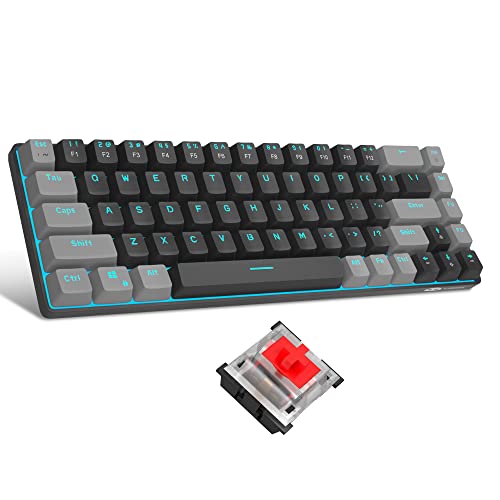
When it comes to mechanical keyboards, durability and longevity are two of the top features.
Made from highly robust materials, these keyboards undergo a rigorous manufacturing process to ensure they withstand extended use without malfunctioning or wearing down.
The keys are particularly long-lasting and resistant to wear, ideal for heavy users who don’t want to worry about replacing their keyboard often.
This sturdy build gives mechanical keyboards an impressive lifespan that often outdoes other types of keyboards.
Tactile and Auditory Feedback
The benefits of mechanical keyboards extend beyond mere durability.
An important characteristic of mechanical keyboards is their ability to provide tactile and auditory feedback.
When you press a key on a mechanical keyboard, you feel a distinct ‘pop’ tactile sensation, and you hear an audible ‘click’ sound.
This feedback can enhance the typing experience by making it more engaging and satisfaction, particularly for those who spend many hours typing each day.
In addition, the tactile response can help reduce typing errors as users can feel whether a key has been fully pressed or not.
Customisable and Replaceable Keys
One of the most appealing aspects of mechanical keyboards is their customisability.
They often allow users to replace individual keys, which means you can tailor your keyboard to meet your unique needs or preferences.
Whether this involves changing the caps for ones with a different texture or colour, or even swapping out certain keys for those that are more frequently used in specific applications, the options are vast.
Furthermore, if a key starts to wear out or becomes damaged, it’s possible to replace it without needing to buy an entirely new keyboard.
Unique Key Actuation
Mechanical keyboards are particularly favoured by people who need accurate and fast keystrokes, such as gamers, programmers or professional typists.
This is because of a unique feature known as key actuation.
Unlike other keyboards that require you to bottom out the keys to register a keystroke, the keys on a mechanical keyboard can be actuated (i.e., can register a command) halfway through a keystroke.
This allows faster typing speeds and less strain on the fingers as less force is required for each keystroke.
Mechanical Cons
1.
Generally more expensive
2.
Can be noisy, potentially disturbing others
3.
Often heavy and not portable
Cost Matters: General Expensiveness of Mechanical Devices
It is generally observed that the prices of mechanical devices are higher when compared to their electronic counterparts.
This can be attributed to the intricacy of their build and the high-end materials often used in their creation.
For individuals or businesses operating on a tight budget, this can be a significant disadvantage.
This cost doesn’t only fall on the initial procurement but also pays into maintenance, replacement, and even disposal in some cases.
For instance, mechanical watches often retail for thousands of dollars, compared to digital watches that often only cost a few hundred.
Noise Levels: Mechanical Devices May Create Disturbances
A notable disadvantage of mechanical devices is their tendency to produce more noise when in operation.
Although this might sound trivial to some, in certain environments, such as offices or libraries, this can potentially disrupt the peace and quiet, causing annoyance or even stress to others present.
Let’s take the example of a mechanical keyboard; the characteristic ‘clack’ sound it makes with each keystroke can indeed pose a problem in a quiet workspace.
This noise is not just limited to large machinery, but even smaller devices like mechanical watches can produce a ticking sound that could be disturbing in silent surroundings.
Portability Challenges: Heaviness & Less Mobility
Often mechanical devices are heavier and larger in size, which significantly hampers their portability.
This drawback is mainly due to the robust materials and complex components that make up these devices.
Compact, lightweight devices are often the preferred choice for today’s mobile society, enabling people to work or entertain themselves wherever they go.
However, a hefty mechanical device, like a typewriter or a record player, isn’t exactly easy to transport due to its weight, and the risk of damage due to transit further complicates matters.
Consequently, this lack of portability can limit the use of such devices to specific locations and hinders opportunities for spontaneous use.
Membrane Pros
1.
Quiet and smooth keypresses
2.
Often lightweight and portable
3.
More affordable
Quiet and Smooth Keypresses
One of the significant advantages of membrane keyboards is the silence they offer.
Unlike their mechanical counterparts that create a noticeable clicking noise when the keys are pressed, membrane keyboards ensure a quiet environment.
This makes them an ideal choice for office settings where a quiet workspace boosts productivity.
The keypresses are not only quieter, but also smoother.
The keys on a membrane keyboard require less force to press down, providing a tender typing experience.
Therefore, such keyboards are the perfect match for individuals who need to accomplish extensive typing tasks without straining their fingers.
Often Lightweight and Portable
Membrane keyboards also stand out for their portability.
Thanks to their design, they are generally thinner and lighter than mechanical keyboards, making them easy to carry and ideal for traveling users.
The lightweight design not only enhances mobility but also contributes to the sleek and modern aesthetic that many users appreciate.
Whether you are on a business trip or operating from a coffee shop, the portability of membrane keyboards is an undebatable advantage.
More Affordable
In addition to the quiet and portable design, membrane keyboards are also budget-friendly.
Due to the simplicity of their components and manufacturing process, they are less costly to produce, a benefit that trickles down to the consumer.
Recommended to our readers: Click here
Consequently, membrane keyboards are often the preference for those needing multiple keyboards for a large office, schools, computer labs, or anyone on a tight budget.
The affordable price does not necessarily mean a compromise in quality.
While mechanical keyboards may offer a more tactile typing experience, membrane keyboards provide an option that balances cost and performance effectively.
Membrane Cons
1.
Might lack tactile feedback
2.
Keys can feel mushy over time
3.
Much shorter lifespan
| Key features | Mechanical Keyboard | Membrane Keyboard |
|---|---|---|
| Durability | Long-lasting with an extended lifespan. | Short-lived, may degrade over time. |
| Typing Experience | Rich tactile and auditory feedback. | Quiet keystrokes with softer feedback. |
| Price | Generally pricier due to their robust build. | A cheaper alternative offering similar functions. |

Lack of Tactile Feedback
One of the significant downsides of membrane keyboards is the missing tactile feedback.
Recommended to our readers: Click here
Whereas mechanical keyboards offer a distinct sense of engagement at every keystroke, membrane keyboards often fail to provide this level of physical interaction.
This feedback is crucial for touch typists who depend on this feeling to know whether their keystrokes register or not.
Mushy Keystrokes
The keypress sensation on a membrane keyboard can degrade over time and become ‘mushy.’ As the underlying rubber dome ages and wears, it loses its initial firmness.
This wear and tear can result in a less satisfying tactile experience, eventually leading to errors in typing.
For instance, if keys start to feel mushy, one may press the same key multiple times unsure of whether the action has registered or not, leading to frequent typos and affecting overall typing efficiency.
Durability and Lifespan
Durability is one of the biggest differences between mechanical and membrane keyboards.

Mechanical units are built to last, with an average life span of over 50 million keystrokes.
The reason behind this robustness lies in their construction—a separate switch under each key that handles the keypress with no significant degradation in quality over time.
On the contrary, membrane keyboards typically have a shorter lifespan due to their build and materials used.
The whole keyboard comprises a single rubber sheet and its latex domes fatigue and degrade over time, affecting their bounce-back ability and consistent responsiveness.
Comparison of Key Features
When comparing a mechanical and membrane keyboard, three key features can help determine the decision: durability, typing experience, and price.
In terms of durability, mechanical keyboards are unrivaled.
They last longer and continue to provide a consistent experience over their lifetime.
Membrane keyboards, due to their construction, may degrade over time affecting the keystrokes’ quality.
In terms of typing experience, mechanical keyboards offer rich tactile and auditory feedback, a boon for touch typists.
On the other hand, membrane keyboards provide a quieter and softer experience, which can be advantageous in shared workspaces or noise-averse environments.
Finally, price becomes a key consideration as mechanical keyboards are generally more expensive due to their robust build and durability.
Membrane keyboards serve as a cheaper alternative offering similar functionalities but compromising on the lifespan and tactile feedback.
For those on a budget or occasional keyboard users, membrane keyboards can be a more suitable choice.
However, in the long run, investing in a mechanical keyboard could be more cost-effective due
In Conclusion: The Battle of Keyboards
Choosing between mechanical and membrane keyboards is a matter of personal preference.
The concentrated logistician might find solace in the rhythmic song of a mechanical keyboard, while a team player in an open office might opt for the quiet subtleties of a membrane keyboard.
Whether your preferences lean toward the gratifying ‘click’ or the stealthy ‘tap’, remember that the storytelling is in the hands of the one who wields the keyboard.
With the right choice, our keyboards can be an empowering extension of our communication apparatus.
The Aesthetics of the Click and Tap
While the mechanical keyboard’s hardy performance is a turn-on for the systematic user, its distinctive ‘click’ is an auditory experience that can invigorate some and annoy others.
This ‘click’ replicates the feel of older, manual typewriters, providing a nostalgic nod to the history of typing.
On the other hand, the unassuming ‘tap’ of a membrane keyboard, characterized by its soft and muted response, promotes a serene work environment that minimizes disruption.
These types of keyboards befit the sensibilities of different individuals.
The former draws in the individual who finds rhythm and motivation in the consistent, full-bodied ‘click’ of keys, possibly someone engaged in ardent coding or wordsmithing.
Meanwhile, the latter could cater to individuals who work in collaborative, silent workspaces, such as libraries or shared office spaces, where the quiet ‘tap’ would be ethical and preferred.
Ergonomics and Customizability
Mechanical keyboards also offer slightly more resistance which gives a surety of input, a definite sense of having pushed a key, leading to fewer typing errors.
Some users report that this physical feedback also provides an oddly satisfying feeling which makes the typing process more enjoyable.
In terms of customizability, mechanical keyboards lead the pack.
They offer the option of custom keycaps and switches – made possible by the modular nature of their keys, allowing writers or coders to customize each key’s feel to their specific taste.
With this freedom comes a personal narrative of usage, augmenting the connection between the typist and their tool.
Membrane keyboards are beloved for their slim profile and lightweight build.
They usually lay more flat on the type surface, characteristic that might aid typists battling with wrist or arm stress.
The seamless surface limits snags, offering a smooth typing experience.
The Ultimate Verdict: Personal Preference and Hardware Awareness
In the end, the choice between mechanical and membrane keyboards boils down to not just personal preference but also an awareness of one’s interaction with the device.
The choice becomes guided by the rationale of comfort, productivity and the nature of your typical workspace.
So, while the mechanical keyboard offers an unabashedly tactile and audible response catering to a presumably more old-school or ritzy crowd, the membrane keyboard’s sleek and silent operation may serve a modern professional audience better, especially those requiring discretion in a quiet workspace.
In conclusion, the most fitting keyboard lends itself to distinctly intimate