Roku Streaming Stick 4K vs Chromecast with Google TV: Which streaming device is best?
In the ever-evolving landscape of streaming devices, two prominent contenders vie for supremacy – the Roku Streaming Stick 4K and the Chromecast with Google TV.
These devices offer users a gateway to a plethora of entertainment options, from popular streaming services to live TV channels.
To navigate the sea of streaming possibilities, consumers often find themselves at a crossroads when deciding between these two formidable devices.
In this article, we delve deep into the realms of the Roku Streaming Stick 4K and the Chromecast with Google TV to determine which one emerges as the ultimate champion for your binge-watching needs.
Features and Capabilities
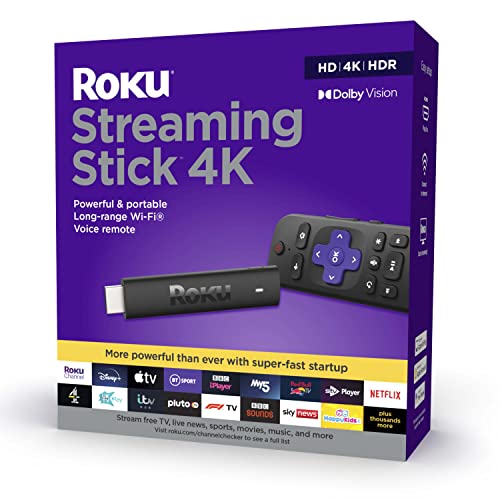
Both the Roku Streaming Stick 4K and Chromecast with Google TV boast an array of features and capabilities that cater to the modern consumer’s streaming demands.
The Roku Streaming Stick 4K offers users access to over 500,000 movies and TV episodes across various streaming services, ensuring a diverse range of content at their fingertips.
Additionally, Roku’s intuitive interface and user-friendly remote make navigation a breeze, enhancing the overall viewing experience.
On the other hand, the Chromecast with Google TV integrates seamlessly with Google’s ecosystem, allowing users to control their smart home devices, check the weather, or even search for content using voice commands through the Google Assistant.
The device also features a personalized recommendation system that suggests movies and shows based on the user’s viewing history, ensuring a tailored and curated streaming experience.
Design and Form Factor
When it comes to design and form factor, the Roku Streaming Stick 4K boasts a compact and sleek design that plugs directly into the HDMI port of a television, minimizing clutter and providing a seamless setup experience.
The device’s small form factor makes it ideal for users looking to save space and maintain a clean entertainment setup.
Conversely, the Chromecast with Google TV features a slightly larger design compared to the Roku Streaming Stick 4K, with a dedicated remote for easier navigation.
The device’s oval-shaped build and minimalist aesthetic blend seamlessly with modern home entertainment setups, adding a touch of sophistication to the living room environment.
Content Selection and Platform Integration
One key aspect to consider when choosing between the Roku Streaming Stick 4K and the Chromecast with Google TV is the availability of content and platform integration.
Roku’s platform offers a wide range of streaming services, including popular ones like Netflix, Hulu, and Amazon Prime Video, ensuring users have access to a diverse library of content.
On the other hand, the Chromecast with Google TV leverages Google’s extensive partnerships with content providers to offer users a comprehensive selection of movies, TV shows, and live TV options.
The device’s integration with Google services like YouTube and Google Photos further enhances the overall streaming experience, allowing users to seamlessly transition between different forms of content.
By considering these factors and weighing the strengths of each device, consumers can make an informed decision based on their individual streaming preferences and entertainment needs.
The Battle of the Streaming Titans
Streaming devices have become an essential component of modern home entertainment setups, providing access to a smorgasbord of content with just a few clicks.
The Roku Streaming Stick 4K and the Chromecast with Google TV stand out as stalwarts in this arena, each offering unique features and functionalities that cater to different preferences.
Let’s embark on a journey to uncover the strengths and weaknesses of these two devices and declare a victor in the ultimate showdown of streaming supremacy.
The Rise of Streaming Devices in Home Entertainment
In recent years, the shift towards digital streaming has revolutionized the way we consume media.
Streaming devices have emerged as indispensable tools in transforming traditional home entertainment setups into smart, connected hubs of on-demand content.
With the rise of platforms like Netflix, Hulu, Amazon Prime Video, and Disney+, viewers have unprecedented access to a vast library of movies, TV shows, documentaries, and original content at their fingertips.
This paradigm shift has not only democratized entertainment but has also created a fiercely competitive landscape among streaming device manufacturers vying for consumer attention.
Roku Streaming Stick 4K: A Closer Look
The Roku Streaming Stick 4K has solidified its position as a top contender in the streaming device market, thanks to its user-friendly interface and extensive content library.
Recommended to our readers: Click here
With support for popular streaming services and a compact, plug-and-play design, the Roku Streaming Stick 4K appeals to users seeking simplicity and convenience in their streaming experience.
Its intuitive remote control, voice search functionality, and customizable interface make navigating through a plethora of entertainment options a breeze.
Recommended to our readers: Click here
Additionally, Roku’s cross-platform compatibility ensures seamless integration with a wide range of smart TVs and home theater systems, enhancing its appeal to a diverse user base.

Chromecast with Google TV: Unleashing Smart Entertainment
On the other hand, the Chromecast with Google TV offers a unique blend of Google’s smart technology and comprehensive content aggregation.
Boasting a visually appealing interface, personalized recommendations, and seamless integration with the Google ecosystem, this streaming device is a powerhouse of intelligent entertainment curation.
Users can leverage Google Assistant for voice commands, effortlessly control smart home devices, and enjoy a tailored content experience based on their viewing habits and preferences.
The inclusion of a dedicated remote with tactile buttons and a user-friendly UI elevates the Chromecast with Google TV to a sophisticated yet accessible streaming solution for tech-savvy consumers.
The Showdown: Analyzing Strengths and Weaknesses
As we delve deeper into the battle of the streaming titans, contrasting the Roku Streaming Stick 4K and the Chromecast with Google TV unveils a nuanced competition of strengths and weaknesses.
While Roku excels in simplicity, cross-compatibility, and a vast content library, Google’s Chromecast impresses with its smart features, personalized recommendations, and seamless integration with the Google ecosystem.
Ultimately, the choice between these two devices boils down to individual preferences, be it ease of use, smart capabilities, or
Design and Interface
When it comes to design, both the Roku Streaming Stick 4K and the Chromecast with Google TV exude a sleek and modern aesthetic.
The Roku device boasts a compact form factor that can be discreetly tucked behind your TV, while the Chromecast with Google TV sports a minimalist design with a prominent Google Assistant button on the remote.
In terms of user interface, Roku’s intuitive menu system makes navigation a breeze, with a straightforward layout that appeals to users of all ages.
On the other hand, Google TV’s interface offers a more personalized experience, curating content recommendations based on your viewing habits and preferences.
Design Elements
In addition to their sleek and modern aesthetics, both devices incorporate design elements that enhance the overall user experience.
The Roku Streaming Stick 4K’s compact form factor not only allows for discreet placement but also contributes to a clutter-free entertainment setup.
Its matte finish and rounded edges give it a polished look that seamlessly blends into any home entertainment system.
On the other hand, the Chromecast with Google TV’s minimalist design underscores Google’s emphasis on simplicity and functionality.
The device’s sleek lines and matte plastic casing exude a sense of sophistication, while the prominent Google Assistant button on the remote highlights the device’s smart capabilities.
Remote Control
The remote controls of both devices play a significant role in the user experience.
The Roku remote is designed with simplicity in mind, featuring clearly labeled buttons and a streamlined layout that ensures effortless navigation.
Additionally, the inclusion of dedicated buttons for popular streaming services like Netflix and Disney+ enhances user convenience.
In contrast, the Chromecast with Google TV’s remote offers a more interactive experience with its voice control capabilities through the Google Assistant button.
Users can easily search for content, control playback, and access information by simply using voice commands, further streamlining the viewing experience.
Customization and Personalization
While both devices provide a user-friendly interface, they differ in terms of customization options and personalization features.
Roku’s interface prioritizes ease of use, with a straightforward menu system that allows users to easily access their favorite streaming services and channels.
Its customizable home screen lets users rearrange app icons and prioritize content based on their preferences.
On the other hand, Google TV takes personalization a step further by leveraging AI algorithms to offer tailored content recommendations.
By analyzing user viewing habits and preferences, Google TV curates a personalized homepage with content suggestions that align with the viewer’s interests, creating a more immersive and engaging viewing experience.
Content Selection and Streaming Quality
One of the key factors that sets streaming devices apart is the variety and quality of content they offer.
The Roku Streaming Stick 4K impresses with its vast selection of channels and apps, ensuring that users never run out of entertainment options.
Additionally, its support for 4K HDR streaming delivers crystal-clear visuals for an immersive viewing experience.
In comparison, the Chromecast with Google TV leverages the power of Google’s search algorithms to recommend content tailored to your tastes, making it easier to discover new shows and movies.
While both devices support popular streaming services like Netflix, Hulu, and Disney+, the Chromecast with Google TV integrates seamlessly with Google’s ecosystem, providing a cohesive entertainment hub for users.
Content Variety and Customization:
Beyond offering a wide range of channels and apps, the Roku Streaming Stick 4K also allows users to personalize their content experience.
Through features like Roku’s My Feed, users can track their favorite shows and receive notifications when new episodes are available for streaming.
This level of customization enhances the user experience by ensuring that they never miss out on the content they love.
Additionally, the Roku Channel offers a selection of free, ad-supported movies and TV shows, further expanding the content options available to users.

Enhanced Streaming Experience:
In terms of streaming quality, the Roku Streaming Stick 4K goes a step further by supporting HDR content in addition to 4K resolution.
High Dynamic Range (HDR) technology enhances the contrast and color accuracy of the visuals, resulting in stunning image quality with greater detail and depth.
This feature ensures that users can enjoy a truly immersive viewing experience, whether they are watching the latest blockbuster movie or a critically acclaimed TV series.

Seamless Integration and Voice Control:
While the Chromecast with Google TV capitalizes on Google’s AI-powered recommendations, it also excels in seamless integration with other Google services.
Users can easily access their Google Photos, Google Calendar, and Google Assistant through the device, creating a unified digital ecosystem for their entertainment and productivity needs.
Furthermore, the inclusion of voice control functionality allows users to navigate their content library, search for specific titles, and control playback using voice commands, adding a layer of convenience to the viewing experience.
Community and Interactivity Features:
Google’s Chromecast with Google TV leverages data from its vast user base to recommend content based on popular trends and user preferences.
This communal aspect of content discovery can lead to the serendipitous discovery of new shows and movies that align with popular tastes.
Additionally, the Chromecast with Google TV incorporates interactive features like polls, quizzes, and live commentary during select programs, enhancing the social aspect of streaming and fostering a sense of community among viewers.
Performance and User Experience
When it comes to performance, the Roku Streaming Stick 4K shines with its snappy responsiveness and lag-free operation.
Whether you’re navigating menus or streaming content, the device delivers smooth performance without any hiccups.
On the other hand, the Chromecast with Google TV offers a fluid user experience, thanks to its integration with Google Assistant for voice commands and smart home control.
The device’s remote control features dedicated buttons for popular streaming services, making it convenient to access your favorite content with a single press.
Performance Improvements in Roku Streaming Stick 4K
The Roku Streaming Stick 4K not only delivers impressive performance but also boasts enhanced hardware capabilities that contribute to its smooth operation.
The device’s quad-core processor ensures quick response times, minimizing any delays when switching between apps or browsing through menus.
Additionally, its 802.11ac dual-band Wi-Fi offers robust connectivity, allowing for seamless streaming in high-definition and 4K formats without buffering issues.
User-Friendly Features of Chromecast with Google TV
In terms of user experience, the Chromecast with Google TV stands out for its intuitive design and user-friendly features.
The integration of Google Assistant enables hands-free operation, allowing users to search for content, control playback, and even manage smart home devices with simple voice commands.
The remote control’s dedicated buttons for popular streaming services like Netflix and YouTube provide quick access to these platforms, enhancing the overall convenience of navigation and content selection.
Intelligent Voice Control with Google Assistant
One of the standout features of the Chromecast with Google TV is its robust integration with Google Assistant.
Users can utilize voice commands to not only search for specific movies or TV shows but also receive personalized recommendations based on their viewing preferences.
This smart voice control feature enhances the user experience by streamlining the process of finding and accessing desired content, making entertainment consumption more efficient and enjoyable.
Pros and Cons
| Device | Pros | Cons |
|---|---|---|
| Roku Streaming Stick 4K | Expansive content selection, Easy-to-use interface, Excellent streaming quality | Limited Google integration, Remote lacks voice control |
| Chromecast with Google TV | Personalized content recommendations, Google Assistant integration, Seamless ecosystem support | Less channel variety, Occasional connectivity issues |
Roku Streaming Stick 4K
The Roku Streaming Stick 4K stands out for its expansive content selection, offering access to a wide range of streaming services like Netflix, Hulu, Amazon Prime Video, and more.
Whether you’re into movies, TV shows, sports, or news, Roku has you covered with its extensive library of channels.
In terms of user experience, Roku impresses with its intuitive and easy-to-use interface.
Navigating through the menu, finding your favorite shows, and discovering new content is a seamless experience on the Roku platform.
This simplicity is especially appreciated by users who value straightforward functionality without unnecessary complications.
One of the key strengths of the Roku Streaming Stick 4K is its excellent streaming quality.
With support for 4K resolution and HDR content, viewers can enjoy crisp, clear images with vibrant colors and sharp details.
Whether you’re watching the latest blockbuster movie or a nature documentary, the visual fidelity delivered by Roku is top-notch.
Chromecast with Google TV
The Chromecast with Google TV is designed to offer personalized content recommendations tailored to your viewing preferences.
By analyzing your watch history and preferences, the device curates a customized list of shows and movies that align with your interests.
Recommended to our readers: Click here
This feature enhances the overall viewing experience by helping you discover new content that you’re likely to enjoy.
One of the standout features of the Chromecast is its integration with Google Assistant, providing hands-free control over your entertainment.
By simply using voice commands, you can search for content, adjust playback settings, or even control smart home devices, all without lifting a finger.
This convenience adds a layer of interactivity and accessibility to your entertainment setup.
Google’s ecosystem support seamlessly integrates the Chromecast with other Google services and devices, creating a unified digital experience.
Whether you’re using Google Photos, Google Nest products, or other Google services, the Chromecast enhances connectivity and synchronicity across your digital ecosystem.
Overall, both devices offer unique advantages and drawbacks, catering to different user preferences and needs in the ever-evolving landscape of streaming technology.
Conclusion

In the epic showdown between the Roku Streaming Stick 4K and the Chromecast with Google TV, both devices emerge as formidable competitors, each catering to specific preferences and priorities.
While the Roku Streaming Stick 4K excels in content variety and streaming quality, the Chromecast with Google TV stands out for its personalized recommendations and Google integration.
Ultimately, the choice between these two devices boils down to your individual needs and usage patterns.
Whether you prioritize a vast content library or a tailored viewing experience, both the Roku Streaming Stick 4K and the Chromecast with Google TV have something unique to offer in the realm of streaming entertainment.
As the streaming device market continues to evolve, consumers are spoiled for choice with a plethora of options that cater to diverse preferences.
Whether you’re a casual viewer looking for endless entertainment or a discerning cinephile seeking the ultimate viewing experience, the Roku Streaming Stick 4K and the Chromecast with Google TV present compelling choices that redefine how we consume content in the digital age.
Choose wisely, and let the magic of streaming elevate your viewing experience to new heights.
Comparison of Technical Specifications
When considering the technical specifications of the Roku Streaming Stick 4K and the Chromecast with Google TV, it’s important to delve deeper into the nuanced differences that may influence your decision.
Recommended to our readers: Click here
For instance, the Roku Streaming Stick 4K boasts a user-friendly interface and robust remote control functionalities, making it ideal for those who prioritize ease of use.
On the other hand, the Chromecast with Google TV integrates seamlessly with other Google services, enhancing the overall connected experience for users deeply entrenched in the Google ecosystem.
User Experience and Interface Design
Recommended to our readers: Click here
Beyond the technical specifications, the user experience and interface design play a crucial role in determining the overall satisfaction with a streaming device.
The Roku Streaming Stick 4K offers a clutter-free interface that prioritizes content discovery, making it effortless for users to navigate through a vast library of streaming options.
In contrast, the Chromecast with Google TV leverages Google’s powerful algorithms to deliver personalized recommendations based on your viewing habits, creating a tailored and intuitive experience.
Recommended to our readers: Click here
Streaming Content and App Ecosystem
One key aspect to consider when choosing between the Roku Streaming Stick 4K and the Chromecast with Google TV is the availability of streaming content and the app ecosystem.
Roku is known for its extensive content library, featuring popular streaming services and niche channels, ensuring that users have a diverse range of options to explore.
On the other hand, the Chromecast with Google TV provides access to the Google Play Store, offering a wide selection of apps and games that can further enhance your entertainment experience beyond traditional streaming services.
Future-proofing and Software Updates
As technology evolves rapidly, future-proofing your streaming device becomes essential to ensure compatibility with upcoming features and services.
The Roku Streaming Stick 4K and the Chromecast with Google TV each have a track record of providing software updates to enhance performance and add new functionalities.
By staying up-to-date with the latest software releases, users can continue to enjoy a seamless streaming experience and access cutting-edge features as they become available.
Final Considerations
In conclusion, the choice between the Roku Streaming Stick 4K and the Chromecast with Google TV may ultimately come down to your unique preferences, viewing habits, and ecosystem preferences.
Whether you prioritize content variety, personalized recommendations, ease of use, or integration with other Google services, both devices offer compelling features that can enhance your streaming entertainment experience.
By carefully evaluating these factors and considering how they align with your individual needs, you can make an informed decision that