Introduction: The Typing Tussle
As digital devices continue to shape our lives, keyboards, the ancillary bridges linking our thoughts to the wired universe, have undergone transformations: the clunky keys adorning personal computer peripherals have given way to sleek, minimalist designs.
Today, two keyboard types dominate the market: mechanical keyboards and chiclet keyboards.
But which one offers a better typing experience?
This article delves into this critical question, and hopefully, by the end, you’ll be able to make an informed decision.
Evolution of Keyboards
The history of keyboards has seen a vast range of changes, reflecting both the evolving needs of users and advancements in technology.
In the computing world’s infancy, keyboards were part and parcel of clunky, dust-gathering machines that occupied entire desks.
Now, they have slimmed down, sporting sophisticated and sleek designs, and can even retract into touchpads.
It was birthed from manual typewriters where keystrokes created indents on ink ribbons to be transferred onto paper.
It later moved on to computer keyboards where keystrokes turn into electrical signals, converted into binary code readable by computers.
Despite having the same purpose, these keyboards have undergone transformations that make each newer version almost unrecognizable compared to its predecessor.
Mechanical Keyboards vs. Chiclet Keyboards: The Current Contenders
In today’s digital-laden age, keyboards are an essential utility.
Whether it’s typing out an office report, coding, chatting with a friend, or simply searching on Google, the keyboard is our go-to tool.
Among the different types of keyboards available, two reign supreme: the traditional mechanical keyboards and the chiclet (or island-style) keyboards.
The mechanical keyboard, reminiscent of old-style typewriters, has a high actuation point and requires a corresponding high force to push each key.
This results in a distinctive ‘click-clack’ sound and a tactile experience some typists find satisfying.
On the other hand, the chiclet keyboard, named after small, squarish gums due to the shape of their keys, offers a completely different typing experience.
These keyboards typically have lower profiles and less travel distance, making them quieter and more low-profile than their mechanical counterparts.

As more and more people interact with digital devices daily, the keyboard’s role changes continuously in response to these propelling needs.
The debate between these two keyboard types, each with some enthusiasts swearing by their preferred choice, signifies their importance in this digital age.
The Million Dollar Question: Which Keyboard is Better?
One might think that with advancements in technology, the newer chiclet keyboard should technically be better.
Others argue that there’s something innately satisfying about the deep physical response of a mechanical keyboard that the chiclet keyboard just can’t replicate.
Therefore, this article will endeavour to answer the burning question posed by keyboard warriors across the globe – between a mechanical or chiclet keyboard, which one provides a superior typing experience?
As keyboards pervade through every facet of our
The Mechanical Keyboard: A Return to Roots
Widely regarded as a relic from the computer age’s heydays, mechanical keyboards have made a spectacular comeback, preferred by typists and gamers alike.
The distinctive clicks add a touch of nostalgia while the switches beneath the keys bring typing precision to your fingertips.
From Niche To Mainstream
The surge in popularity of mechanical keyboards is a testament to the age-old adage that old is indeed gold.

Once broken down to the niche category and dismissed as a dying breed, mechanical keyboards have seen a resurgence in recent years that has catapulted them from the tech flea market right back to the corporate boardroom.
Professionals ranging from coders, writers, and data entry operators to gamers, designers, and video editors claim to experience significantly improved performance and comfort with these keyboards.
The Unmistakable Clicking Sound
The distinct auditory feedback provided by the click-clack sound of mechanical keyboards is more than just a novelty.
It’s a game-changer, setting mechanical keyboards apart from their membrane and scissor-switch counterparts.
Each keystroke, a statement in its own right, adds an auditory rhythm that many users find therapeutic and satisfying.
It’s reminiscent of vintage typewriters, infusing a sense of nostalgia into the present digital world.
Precision and Customizability
The mechanical switches under the keys are responsible for the precision that typists and gamers adore.
With various switch types like the Cherry MX Blue, Cherry MX Brown, and the Razer Green, each providing a unique combination of tactility and noise, users can choose a keyboard that aligns perfectly with their typing preferences.
The keypress in mechanical keyboards is registered halfway through the press, which allows faster typing and a better gaming experience due to reduced response time.
The weight and distinct feeling of every individual keystroke are seen as an undoubtedly enhancing factor in typing accuracy.
Durability and Longevity
Mechanical keyboards, built to withstand the test of time, hold their charm for years and often for decades.
While a membrane keyboard comes with an average life span of 5 to 10 million keystrokes per key, a mechanical keyboard significantly outlasts this figure, with most keys rated for up to 50 million presses.
They can endure more physical abuse, which is beneficial in environments where the keyboards are heavily used or exposed to harsh conditions such as in gaming, professional typing, or public places like libraries and internet cafes.
The Retro-Joy and Aesthetics
Apart from functional benefits, mechanical keyboards also offer an aesthetic appeal and joy of use that substantially enhance the user experience.
The intricate construction, the retro look, and the customizable RGB lighting transform them into a piece of technology and art synchronously.
Picturesque designs, vibrant colors, and user-customizable lighting
The Mechanics of the Mechanical Keyboard
Each key on a mechanical keyboard houses an independent key switch mechanism.

This allows for tactile feedback, a feature often noted in keyboard comparison graphs.
When you fully compress a key, a physical switch registers the movement, making typing on a mechanical keyboard a rather cathartic experience.
Understanding the Independent Key Switch Mechanism
The independent key switch mechanism found in mechanical keyboards is the driving force behind their distinctive tactile feedback.
Each key, as the name suggests, act independently from the others, containing its own spring-loaded switch.
This individuality means that no matter how many keys are pressed at the same time (this is referred to in the tech world as “n-key rollover”), each one will be registered separately by the computer.
This degree of precision is ideal for typists and gamers who often press multiple keys simultaneously.
The Essence of Tactile Feedback
Tactile feedback is the satisfying “click” or “clack” feedback you receive from pressing a key on a mechanical keyboard.
The level of feedback, noted in decibels in keyboard comparison graphs, can range from barely noticeable to very distinct.
The click accompanies a physical sensation of the button being fully pressed, which can reduce typing errors and increase speed.
This also contributes to that all-important tangible experience of using the keyboard, which many users believe fosters more accurate and efficient typing.
The Role of Physical Switch in Typing Experience
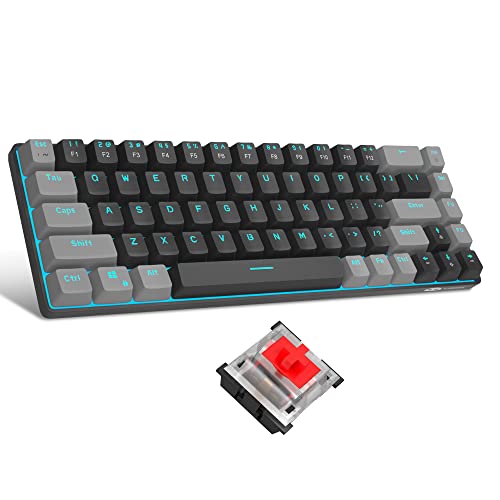
A physical switch is integral to the tactile feedback experience of mechanical keyboards.
When you press a key, the switch moves, which forces the spring to compress.
Once the key is fully compressed, the spring releases, pushing the key back to its original position.
It’s this action of the spring compressing and releasing that creates the notable sensation and sound of a mechanical keyboard.
The Cathartic Experience
Many people report the use of a mechanical keyboard as a cathartic, relieving experience.
This goes beyond the satisfying tactile feedback.
The sturdy build, the comforting click-clack sounds, and the smooth responsiveness all help to create an using experience that can be both rewarding and therapeutic.
Writing or gaming sessions can turn into an opportunity to manage stress and achieve a sense of satisfaction.
The Importance to Particular Groups
For professional typists who spend hours daily on their keyboards, or gamers who require quick responses and multi-key combos in their gaming sessions, the unique features of mechanical keyboards can vastly improve their overall experience.
Many gamers, programmers, editors, and writers insist on mechanical keyboards for their precision, responsiveness, and tactile feedback, all bolstered by the impressive mechanics beneath each key.
All these characteristics intertwine to paint the picture of the glorious living, breathing entity that is the mechanical keyboard.
Pros and Cons: Mechanical Keyboards
Mechanical keyboards offer unparalleled accuracy, durability, and tactile response.
However, they are audibly louder, bulkier, and more costly than their chiclet counterparts.
Unmatched Accuracy
Mechanical keyboards are renowned for their superior accuracy.
Unlike typical membrane keyboards or chiclet styles, such as those found on laptops, mechanical keyboards register key presses when the key is only half way down.
This means that users can type faster and with fewer errors, a vital feature for programmers, writers, and anyone who types for a living.
A mechanical keyboard ensures each keystroke matters, making it a worthy investment for those seeking precision in every task.
Robust Durability
Mechanical keyboards are built to last.
Their robust construction uses individual mechanical switches under each key, insulating them from wear and tear better than their non-mechanical counterparts.
These keyboards are tested for tens of millions of keystrokes, ensuring their longevity.
In the event a key becomes damaged, it can be individually replaced, providing further longevity compared to having to replace the entire keyboard on standard models.
Tactile Response
The third major pro of a mechanical keyboard is the unparalleled tactile response it provides.
Each keystroke results in a reassuring click, a physical confirmation of entered commands unlike the spongy response of a traditional membrane keyboard.
For gamers and typists alike, this immediate feedback can significantly improve speed and overall user satisfaction.
The tactile feedback can even reduce fatigue in long typing or gaming sessions.
Audible Noise
A commonly noted con of mechanical keyboards is their noise level.
Each keypress results in a characteristic clacking sound, which can range from a satisfying click to a loud and possibly distracting noise.
While some users enjoy this audible feedback, associating it with productivity, others may find it bothersome especially in shared workspaces or quiet environments.
Size and Space
Mechanical keyboards are generally larger and bulkier than chiclet keyboards.
They are less likely to fit into a slim laptop bag or a compact workstation.
This makes them less suitable for mobile workers or those with limited desk space.
They also often lack the sleek, minimalist design of chiclet or membrane keyboards, making aesthetics another consideration for potential users.
Cost Considerations
Lastly, mechanical keyboards are typically more expensive than non-mechanical alternatives.
Their superior materials and construction, coupled with their long lifespan, contribute to a higher purchase price.
However, many users consider this a worthy investment over time, given the durability and performance advantages of these keyboards.
For those on a tight budget though, it may be harder to justify the initial outlay of expense.
Chiclet Keyboards: Sleek, Silent, Ubiquitous
Chiclet keyboards, named aptly after the small, rectangular chewing gum, are now commonplace in laptops and compact devices, offering slim design profiles and quieter operations.
The Evolution of Chiclet Keyboards
The chiclet keyboard, with its trademark flat surface and raised keys akin to a chiclet gum, has become a staple design for many personal computing devices.
The chiclet-style keyboard was first incorporated into personal computers in the early 1980s.
Though initially unpopular due to its perceived lack of tactile feedback compared to traditional mechanical keyboards, advances in technology and user preference for low noise, compactness, and sleek aesthetics have surged its popularity.
The Aesthetics & Functionality
As the name suggests, chiclet keyboards took inspiration from tiny, rectangular-shaped chiclet gum.
These keyboards offer a visually appealing and minimalistic design – keys that are widely spaced and well defined, making typing errors less frequent.
Each key on this type of keyboard is enclosed in a small, separate casing, indicative of the keyboard’s chiclet-esque design.
This layout provides a simplistic and smooth look that can seamlessly blend with the overall aesthetic of high-end laptops like the MacBook, Dell XPS, and ASUS Zenbook.
The Silence is Golden
One of the most significant advantages of chiclet keyboards is in the volume, or rather, the lack thereof.
Traditional keyboards, particularly mechanical ones, can be noisy when keys are struck, which might lead to disturbance in quiet settings or during late-night work sessions.
On the other hand, chiclet keyboards offer a much quieter typing experience due to the lack of mechanical movement beneath each key.
This makes them a preferred choice for workplaces, classrooms, and libraries where maintaining silence is crucial.
Compact and Portable
The slim profile of chiclet keyboards makes them an excellent choice for compact devices such as laptops and handheld devices.
Unlike their traditional counterparts with bulky keys and frames, chiclet keyboards result in sleeker and more portable devices, which is a significant factor contributing to their ubiquity.
With the increasing demand for remote and mobile work options, such slender and lightweight designs take precedent.
Drawing the Tech Giants
Major technology companies such as Apple, Dell, and Lenovo, among others, have adopted the chiclet keyboard for their devices.
For instance, Apple’s MacBook series has been lauded for its sleek design, incorporating a high-quality chiclet keyboard that offers both style and comfort.
This has set a trend among manufacturers, following in Apple’s footsteps to provide beautiful and user-friendly configurations.
It is through such endorsements that the chiclet keyboard has become ubiquitous in the world of computing.
Overall, the story of chic
Unwrapping the Chiclet Keyboard

Chiclet keyboards utilize rubber dome switches under each keycap.
When a key is pressed, this dome collapses, creating an electrical circuit that sends the signal to your computer.
The low profile keys result in less travel distance, making typing quicker but potentially less accurate, as demonstrated in comparison diagrams.
The Structure of Rubber Dome Switches
The rubber dome structure in a Chiclet keyboard incorporates an enhanced silicone hemisphere under each key.
This hemisphere acts as the medium between your finger pressure and the responsive commands on your computer or mobile device.
The keycaps, typically a flat design, sit securely on top of these domes, protecting the sensitive rubber switch and creating the distinctive aesthetic appeal of these keyboards.
The Mechanics of Contact Registration
Every keystroke you make on a Chiclet keyboard causes the rubber dome to collapse.
This is not a catastrophic failure but an intended response.
The dome’s compression disrupts an electrical circuit beneath it, and this mechanical disruption is recognized as a keystroke.
The signal is immediately conveyed to the device’s processor.
The dome then bounces back to its original shape, disconnecting the circuit and preparing for the next keystroke.
Speed versus Accuracy
The physical design of Chiclet keyboards reduce key travel distance – the distance a key shifts down when pressed before it’s recognized as a keystroke.
This allows users to type faster because each key returns to its original position quickly after being pressed.
But this feature does come with a trade-off.
Typing at high speeds can generate more typing errors due to the adjacent positioning of the keys, resulting in a great possibility of accidentally hitting an incorrect key.
The Evolution of Chiclet Keyboards
Chiclet keyboards have evolved significantly over time.
Earlier versions of this keyboard model focused much on aesthetics and less on user-experience.
Consequently, they were widely criticized for their lack of tactile feedback and large gaps between keys.
Nowadays, manufacturers have addressed these drawbacks by increasing the size of the keys and minimizing the spaces between them.
They also included curved surfaces on the keys to improve typing accuracy and post-stroke movement – the key’s shift from the bottom of the stroke back to the top.
Influence of Chiclet Keyboards on Typing Comfort
While the overall verdict on the Chiclet keyboard may be subjective, given the personal preferences of each user, many find that the less pronounced key shape considerably reduces finger fatigue.
This means you can type for extended periods without feeling discomfort, making Chiclet keyboards an excellent choice for programmers, writers, and professional eSports players who spend many hours on their keyboards.
However, some may argue that the lack of physical feedback can lead to an increased rate of typos, as there is less evidence of a successful keystroke.
Importance of Acclimatization
One of
Recommended to our readers: Click here
Pros and Cons: Chiclet Keyboards
Chiclet keyboards shine in areas of cost-efficiency, compactness, and quietness.
However, they lack the tactile feedback offered by mechanical keyboards and may not last as long under heavy usage.
Advantages of Chiclet Keyboards
Recommended to our readers: Click here
Chiclet keyboards are prevalent in modern computing, especially with notebooks and all-in-one computers.
One key reason is their cost-efficiency.
Being less complex and easier to manufacture than mechanical keyboards, Chiclet keyboards are often the go-to choice for budget-focused buyers.
Their simpler construction means they can be mass-produced at a lower cost without sacrificing functionality.
Compactness is another strength of Chiclet keyboards.
The keys are smaller and noticeably flatter than those of traditional keyboards, leading to a reduced overall size.
This makes them ideal for portable devices where space is a premium or for users seeking a sleek, minimalistic setup.
Due to their design, Chiclet keyboards can make a laptop or a desk appear more streamlined and modern.
Recommended to our readers: Click here
Lastly, quietness is an often-underappreciated advantage.
The less pronounced key travel results in quieter typing, which can be a boon in shared living or working spaces.
The discreet typing noise prevents disruption of colleagues’ focus or the quiet harmony of a home environment.
Disadvantages of Chiclet Keyboards
Nevertheless, Chiclet keyboards do come with their share of downsides.
A significant disadvantage is the lack of tactile feedback.
Mechanical keyboards are acclaimed for their noticeable click or bump when a key is actuated, providing physical confirmation to the typist.
This tactile feedback can be of particular importance to touch-typists and gamers, who rely on this sensory response to ensure accuracy during rapid keystrokes.
The duration of Chiclet keyboards under heavy usage is another concern.
While good enough for light to moderate use, they may not fare well under intensive typing or gaming sessions due to their relatively delicate key mechanisms.
The keys on these keyboards can wear out more quickly than their mechanical counterparts, resulting in fading letters, unresponsive keys, or inconsistent key travel over time.
Recommended to our readers: Click here
Consequently, people who frequently use their keyboard or demand a lot from their equipment might find that Chiclet keyboards require more frequent replacements, which could offset their initial cost advantage.
Bridging the Divide: The Choice of Keyboard
When it comes to deciding between a mechanical and a chiclet keyboard, it boils down to recognizing your typing needs and preferences.
If you’re a heavy typist who values comfort, or a gamer needing precision, a mechanical keyboard fits the bill.
However, if portability and low sound levels matter more to you, a chiclet keyboard leads the way.
Going Mechanical: Perfect for Gamers and Heavy Typists
When you do ultimate gaming sessions or spend most of your day coding and drafting documents, a mechanical keyboard might be your best bet.
Mechanical keyboards have individual mechanical switches under each keycap, allowing you to get a tactile response and audible click with each press.
You get a clear feeling of whether or not you’ve fully pressed the key, essential for quick gaming reactions and speed typing.
Razer, a leader in the gaming industry, offers a range of mechanical keyboards delivering fantastic performance in both gaming and typing.
Their most talked-about model, the Razer BlackWidow Elite, is known for its robust keys that offer speed, accuracy, and a satisfying tactile feedback.
It also features programmable macros – a gamer’s delight for quick commands.
Similar benefits are reported by writers who can type at full speed without worrying about missing any keypress.
Software developers also prefer mechanical keyboards, such as the Durgod Taurus K320, which offers Cherry MX switches renowned for their reliability, performance, and longer lifespan.
Unlike other keyboard types, these mechanical counterparts allow users to customize their keyboard’s tactile attributes to match their distinctive typing requirements – a feature that steeply elevates their project productivity.
The Chiclet Revolution: Bringing a Seamless Typing Experience
Recommended to our readers: Click here
In today’s era where minimalism and portability are lauded, chiclet keyboards have gained immense popularity.
With a flat and slim layout, where the keys seem to protrude from a single layer, these keyboards emphasize a compact build without sacrificing overall typing comfort.
Aside from being sleek and stylish, they offer quiet typing, ideal for users who jump from one meeting room to another or those who work in packed shared spaces.
Apple’s Magic Keyboard is a prime example of a chiclet model.
It features low-profile, well-spaced keys that make for a comfortable typing experience, even in prolonged periods of time.
Not to mention, they’re whisper quiet, which can be a relief for coworkers in close quarters.
In addition, Logitech’s wireless chiclet keyboard, known as the K780, has also made waves.
This portable model offers multi-device functionality, on top of its comfortable, quiet typing experience.
It’s a keyboard that marries convenience, silence, and chic design.
Recommended to our readers: Click here
In conclusion, both mechanical and chiclet keyboards come with their unique benefits, each catering to different user needs.
Whether you’re a die-hard gamer, a detail-oriented programmer, an ardent
Conclusion: Know thy Keys
Whether you choose a chiclet or a mechanical keyboard, it’s essential to recognize that both come with specific strengths and weaknesses.
It’s all about finding ‘the one’ that matches your rhythm, augments your typing speed and accuracy, and whisper notes of comfort to your fingertips.
The correct keyboard isn’t just about the aesthetics or the price tag, but a tool that can unshackle your thoughts and let them dance effortlessly on the digital stage.
| Mechanical Keyboards | Chiclet Keyboards | |
|---|---|---|
| Comfort | Highly comfortable in long-term use | May cause discomfort in prolonged usage |
| Durability | Built to last for years | Less durable than mechanical keyboards |
| Noise Level | Loud and clicky | More quiet |
| Price | More costly | Cheaper choice |
| Portability | Bulky and heavy | Sleek and portable |
| Visual Appeal | Classic and customizable | Sleek design |
In closing, always try before you buy.
After all, typing is not just about mind and muscle memory, it’s a sensory experience.
So go ahead, take some strokes, feel the keys, and let your fingertips make the choice.
After all, it’s them who will be dancing to the rhythm of your thoughts.
Selecting the Perfect Keyboard: Chiclet or Mechanical?
Every keyboard shares the common goal of translating the thoughts brimming in your mind into visible characters on your monitor.
However, the journey in doing so can vary significantly depending on whether you’re working on chiclet or mechanical keys.
Chiclet keyboards, common on modern laptops and slim keyboards, offer a sleek and minimalist design, originated from their namesake – small, square-shaped chewing gum, the Chiclets.
They are silent and unobtrusive, ideal for workspaces where noise could be a concern.
Moreover, their lightweight, compact construction renders them easily portable, favorable for those frequently on the move.
However, they may not offer the same comfort level as mechanical keyboards during prolonged usage.
The shorter travel distance may cause discomfort to some typists, particularly those with repetitive strain injuries.
Mechanical keyboards, on the other hand, embody a more classic keyboard design with individual high-profile keys equipped with a unique switch mechanism.
This approach guarantees a high level of comfort, especially in long-term usage, and they are designed to withstand heavy use.
They are noticeably audible when typing, which some users find satisfying, translating into the rhythmic symphony of productivity.
In addition, they are customizable, allowing keyboard enthusiasts to switch keycaps and add a personal touch.
But those advantages come with the price of being more bulky and considerably more expensive than chiclet keyboards.
It’s More Than A Tool, It’s An Extension of You
In the end, choosing the right keyboard is much more than just picking a peripheral device.
It’s about selecting an extension of your creative mind, a tool that harmonizes with your thoughts and speed of execution.
While each type of keyboard offers distinct features and benefits, neither can be objectively deemed better than the other.
It is a matter of personal preference shaped by your comfort, aesthetic sensibility, work environment, and of course, your budget.
Testing Is The Key. Literally!
Always remember to ‘try before you buy’.
This crucial step is one which can save a lot of reconsideration and unnecessary exchanges down the line.
Corporations and mid-large scale businesses who invest heavily in office hardware are known to have ‘keyboard testing’ areas where users can physically try out different keyboards before settling on a choice.
If you’re not able to test one out in a store, consider borrowing one from a friend or researching online reviews, typing test video demonstrations to get a sense of how it responds.