Introduction
In the world of digital productivity, where the art of typing is not just a skill but a requirement, it’s the instrument of production that makes all the difference.
Two true stalwarts fighting for the prime spot are the Mechanical Keyboard and the Scissor-Switch Keyboard.
This comparison of the two stirs up a storm in the domain of professionals, gamers, and enthusiasts alike.
Outlined in this feature are the facets that separate these two goliaths in the world of key chattering.
Overview of Typing in the Digital Age
Typing, once just a skill that added to your resume, has evolved significantly in the age of digital productivity.
Today, it serves as a cornerstone, impacting a wide array of fields — from professional writing and data entry to coding and gaming.
The illusion that any keyboard would suffice has long been debunked.
What professionals, gamers, and enthusiasts now pursue, is not just a keyboard but a tool that augments their productivity and offers an elevated user experience.
From Typewriters to Keyboard Types
The evolution has been remarkable.
From the hefty typewriters to slim scissor-switch keyboards, and responsive mechanical keyboards, each development has aimed at enhancing speed, accuracy, and user comfort.
However, the two key styles that have carved a niche in this market are mechanical keyboards and scissor-switch keyboards.
Each of them has stirred up ardent supporters who argue for their superiority, ultimately leading to intense debates among user communities.
Keyboards: An Essential Tool for Virtually Everyone
The significance of these typing instruments extends beyond the professional world.
Gaming enthusiasts, for instance, rely on the tactile feedback and responsiveness of their keyboards for precision during gameplay.
Fast typing speed and negligible lag can often mean the difference between victory and defeat.
Additionally, writers who spend long hours crafting their pieces also value the comfort and tactile experience that a good keyboard provides.
In this vein, the keyboard is an instrumental site of innovation and carefully thought-out design, accommodating various needs from stenographers to playwrights.
What turns the dial is the pressing question – mechanical or scissor-switch keyboard?
The Clash of the Keyboard Titans: Mechanical and Scissor-Switch
This is where the battle lines are drawn in the vast world of keyboards.
On one side, we have the mechanical keyboards known for their distinctive ‘clack’ sounds, offering a sense of satisfaction to the user.
On the other side, stand scissor-switch keyboards known for their quiet operation and lower profile that enhance mobility.
Through the lens of this feature, we’ll cross-examine these two formidable options, breaking down their unique features and idiosyncrasies.
Standing at the crossroads of this keyboard clash, we shed light on what truly separates these two titans and enable you, the user, to choose the optimal tool for your individual needs.
Complimenting the roar of their battle, we’ll venture into the quiet murmurs of the user community, drawing from their experiences and
Anatomy of Keyboards
Before jumping headfirst into the comparison, let’s take a detour and understand the basic anatomy of these keyboards.
Mechanical keyboards hark back to the early days of computing, with an individual spring-loaded switch under each key, which makes for a highly tactile and audible typing experience.

On the other hand, scissor-switch keyboards, the reigning champion of modern laptop keyboards, feature a unique ‘scissor’ mechanism beneath each key.
This mechanism allows for low-profile design and quiet operation, making it ideal for portable, compact setup.

Delving into Mechanical Keyboards
Mechanical keyboards offer both a unique proposition and nostalgia, conjuring memories of the classic IBM Model M or early Apple keyboards.
At the very heart of a mechanical keyboard’s operation is its key switch, which literally performs a ‘switching’ action each time it is pushed.
Each key is equipped with a spring and a switch, which accounts for the characteristic ‘click-clack’ sound and the unmistakable, tactile response that typists and gamers worldwide have grown to love.
Each mechanical keyboard switch is a feat of engineering, primarily composed of a base, a spring, a stem, and a metal contact leaf.
When a key is pressed, the stem pushes the spring down until a certain point, where the leaf then snaps against the base, registering the keystroke.
Unlike membranes or domes, there’s no need to bottom out the keys to register a keystroke, leading to a smoother and faster typing experience.
This ability to register a keystroke midway with a decisive tactile and audible feedback is what truly sets mechanical keyboards apart.
When talking about mechanical keyboards, the variety of switch types also play into their popularity – types that vary from linear and silent to tactile and clicky, each catering to a different typing or gaming preference.
Brands like Cherry MX, Kailh, and Gateron have become household names in the keyboard world, each manufacturing a vast range of switch varieties to suit varying requirements.
Scissor-Switch Keyboards: The Modern Standard
Scissor-switch keyboards, as evident from their name, utilize a distinct ‘scissor’ structure beneath each keycap.
This mechanism consists of two plastic pieces, the scissor arms, that interlock in a cross or ‘scissor-like’ manner.
When a key is pressed, these arms slide apart, allowing the key to compress.
Upon letting go, the inherent tension brings the arms back together, lifting the key to its original position.
The low-level profile, low travel distance, and quiet operation of scissor-switch keyboards prove beneficial for contexts that require compact design and silent operation.
This is why they have been ubiquitously observed in modern laptop keyboards, as well as slim, wireless desktop keyboards.
Familiar examples of scissor-switch keyboards include Apple’s Magic Keyboard, Logitech’s K750 Solar Keyboard, and most notebook keyboards from brands like Dell, HP, and Lenovo.
However, being much smaller and compact means scissor-switches offer less tactile feedback than mechanical counterparts.
Typing Experience
One of the primary variables that users consider when looking for a keyboard is the typing experience.
Mechanical keyboards provide an unmatched tactile feedback, making typing a satisfyingly clicky affair.
On the contrary, scissor-switch keyboards, while not producing the same level of tactile feedback, offer silent typing that is appreciated in quiet places like libraries and offices.
Understanding Tactile Feedback
Tactile feedback refers to the immediate physical response or sensation experienced when pressing a key.
In mechanical keyboards, this feedback is typically characterized by a noticeable ‘bump’ or ‘click’ that signifies the activation of the key.
This physical confirmation often enhances the typing experience by adding a sense of gratification, creating a connection between the user’s fingers and the digital input.
The Allure of Mechanical Keyboards
Mechanical keyboards use separate, mechanical switches under each key that provide both tactile and audible feedback when pressed.
It’s not just the robust typing experience they offer but also the potential for customization that separates them from the pack.
Every key switch can be replaced or modified for a different feel or sound, enabling users to cater to the keyboard to their specific typing style.
Additionally, the durability and longevity of mechanical keyboards are other notable benefits.
Some mechanical switches are rated for up to 70 million key presses, making them a long-lasting choice for heavy typists and gamers.
The Quiet Efficiency of Scissor-Switch Keyboards
In contrast to mechanical keyboards, scissor-switch keyboards offer a considerably quieter typing experience.
This is because their design utilizes a plunger that forces two plastic pieces (arranged in a ‘scissor’ structure) apart and downwards with each key press.
This results in less noise during typing, making them a preferred choice for quiet environments like libraries or offices.
However, they don’t offer the same level of tactile feedback as mechanical keyboards, which might be a drawback to people who are accustomed to the tactile sensation while typing.
The Hybrid: Membrane Keyboards
There also exist hybrid options, like membrane keyboards, that attempt to strike a balance between tactile feedback and noise.
These keyboards have a rubber or silicone keypad that provides a slight resistance and a softer keystroke for quieter typing.
However, the level of tactile feedback is often perceived as inferior to mechanical switches, making them a middle ground selection that doesn’t fully satisfy those who prefer distinct tactile feedback or a truly silent typing experience.
In conclusion, the typing experience is a significantly personal preference, often shaped by the user’s environment, usage habits, and nuanced likes and dislikes.
Whether a user prefers the satisfying, clicky feedback of a mechanical keyboard, or the quiet, discreet keystrokes of a scissor-switch keyboard, will be a matter of individual choice, balancing the requirements of tactile feedback, noise generation, and even durability.
Durability and Lifespan
Hand-in-hand with typing experience, another aspect that places mechanical keyboards at the edge of a battleground is their durability and lifespan.
Mechanical keys are designed to withstand up to 50 million keystrokes, making them extremely durable and long-lasting.
In comparison, scissor-switch keyboards, due to their design and delicate mechanics, usually have a lifespan of 10 million keystrokes.
Understanding the Durability of Mechanical Keyboards
Particularly for those who type extensively, be it for work or leisure activities like gaming, the durability of a keyboard is a crucial feature.
The reason why mechanical keyboards exhibit such strength is because of their distinct design.

Each key on a mechanical keyboard has its own switch, comprising a base, spring, and stem.
This design is highly robust and ensures the keys can bear the brunt of repeated and heavy use.
One striking proof of the durability of mechanical keyboards is their strong presence in rigorous environments like industrial settings and scientific research labs.
People in these fields require equipment that can withstand harsh conditions, which speaks volumes about the resilience of mechanical keyboards.
Despite the harsh conditions and intense usage, they are known to perform consistently without major failures.
Recommended to our readers: Click here
Lifespan: A Key Benefit of Mechanical Keyboards
The average lifespan of mechanical keyboards is significantly longer than other types.
Frequently, these keyboards can comfortably exceed their stated 50 million keystroke lifespan, continuing to function accurately even after their ‘official’ lifecycle.
A real-life example of such durability is the IBM Model M keyboard which was introduced in the mid-1980s.
Despite being decades old, there are still functional units around, notable for the tactile and auditory feedback they provide, qualities which have been carried over into modern mechanical keyboards.
Comparing with Scissor-Switch Keyboards
On the other end of the spectrum, we have scissor-switch keyboards.
These keyboards get their name from the design of the switch under each key, which resembles a pair of scissors.
While they provide a quiet and smooth typing experience, they lag behind mechanical keyboards in terms of durability.
Unlike mechanical keyboards, where each key operates independently, scissor-switch keyboards are interconnected.
This means that an issue with one key can easily affect the others.
Recommended to our readers: Click here
Their interconnected nature and delicate mechanics limit these keyboards to about 10 million keystrokes, which is only a fifth of what mechanical keyboards offer.
In conclusion, when investing in a keyboard, it’s essential to consider both the short-term typing experience and the long-term endurance of the unit.
For durability and lifespan, mechanical keyboards hold a decisive edge, making them a more cost-effective choice in the long run.
Portability
In the context of portability, scissor-switch keyboards take the trophy home owing to their slim and lightweight design, making them an ideal companion for mobile workers and travelers.
Mechanical keyboards, owing to their bulky and heavy design, might not be suitable for people on the go.
Portability Factor of Scissor-Switch Keyboards
The unparalleled portability of scissor-switch keyboards significantly stems from their design.
These keyboards, compared to traditional or mechanical ones, are thinner and lighter.
They are named ‘scissor-switch’ because of the expertly engineered mechanism hidden beneath each key, which looks reminiscent of a pair of scissors.
This design not only contributes to their lightweight and slim aspect but also helps enhancing typing comfort and response time.
To push the portability factor a notch higher, many models of scissor-switch keyboards are wireless.
Either connecting via Bluetooth or a small USB dongle, these peripherals can easily pair with almost any device, from laptops to smartphones, requiring no physical connection.

The absence of cords adds to the ease of packing and transporting them, eliminating risks of tangles or damages to cables during transit, further making them an irresistible choice for mobile workers and tech-savvy travelers.
Examples of Scissor-Switch Keyboards
Among the plethora of scissor-switch keyboards available on the market, the Apple Magic Keyboard remains a favorite of many.
A masterstroke in engineering and design, it exudes sleekness and user-friendliness.
Despite being incredibly thin, its keys are sturdy and responsive, making typing a comfortable and exhilarating experience.
Pair it with an iPad or MacBook, and you have a versatile workstation ready to follow you anywhere.
Recommended to our readers: Click here
Another prominent example is the Logitech K380.
This aesthetically pleasing and compact keyboard supports multi-device connection, allowing users to effortlessly switch between devices.
Its slim profile, combined with durability, make it an excellent travel companion.
Contrastive Analysis: Mechanical Keyboards
On the other end of the spectrum are mechanical keyboards.
These are often lauded for their tactile feedback and durability, making them a preferred choice for gamers and professional typists.
However, their robust structure boasts a more substantial weight and thickness that significantly impede their portability.
Composed of individual mechanical switches for every key, mechanical keyboards carry a bulkier and heavier built than their scissor-switch counterparts.

Each of these switches adds to the overall weight of the device and its thickness, making them less ideal for constant transportation.
Packing them into a backpack or carrying case along with a laptop or tablet can make for a hefty load.
In conclusion, when it comes to portability, scissor-switch keyboards are undoubtedly the champions.
Offering a slim, lightweight design, wireless connectivity, and robust performance, they cater perfectly to the needs of anyone
Pros and Cons
Given the above differences, it’s clear that both keyboard types have their merits and drawbacks.
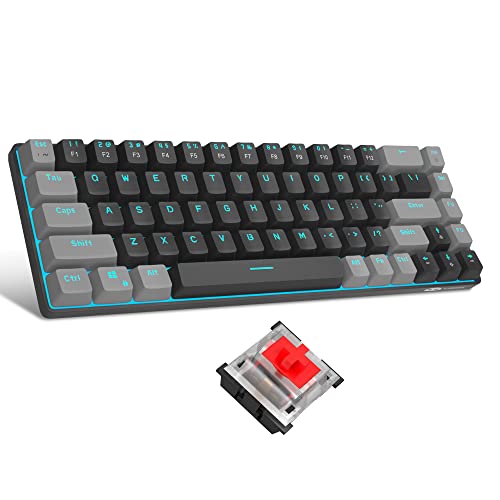
To help you further, here’s a quick rundown on the pros and cons:
| Mechanical Keyboard | Scissor-Switch Keyboard | |
|---|---|---|
| Pros | Superior typing experience, greater longevity. | Quieter operation, low-profile design, portable. |
| Cons | Large and heavy, potentially loud for quiet environments. | Less tactile feedback, shorter lifespan. |
Mechanical Keyboard: Advantages
In considering the advantages of mechanical keyboards, the superior typing experience is often the primary factor for users.
Mechanical keyboards come with a wide variety of customisable options such as different types of key switches (linear, tactile, or clicky), adjustable actuation points, and custom keycaps.
These individual key options make the typing experience unique, providing both auditory and tactile feedback with each keypress.
This feedback can dramatically increase typing speed and reduce the likelihood of typing errors.
Mechanical keyboards are also known for their durability.
High-grade plastic or metal framing, heavy duty switches and individually replaceable keys all contribute to their enhanced lifespan.
Depending on the key switch type and the individual usage, it is not uncommon for a mechanical keyboard to last 10 years or more, making them a cost-effective option in the long run.
Mechanical Keyboard: Disadvantages
Recommended to our readers: Click here
Despite the many advantages, mechanical keyboards do have a few downsides.
They are typically larger and heavier than other types.
This is partly attributed to their robust construction and the fact that each key has its own mechanical switch.
Due to their size and weight, they may not be the best fit for mobile or space-constrained setups.
Additionally, mechanical keyboards are often louder compared to their non-mechanical counterparts.
Particularly, the clicky and tactile variants produce a distinctive ‘click-clack’ noise.
Depending on personal preference or the surrounding environment, this auditory feedback can be either satisfying or distracting.
Scissor-Switch Keyboard: Advantages
Turning to scissor-switch keyboards, one of their major selling points is their quieter operation.
The interlocking plastic scissor design beneath each key significantly reduces noise levels, which can make these keyboards ideal for use in quiet environments such as libraries or late-night work sessions.
Scissor-switch keyboards are also known for their sleek, low-profile design.
The keys are closer to the keyboard base due to the unique scissor mechanism, resulting in a shorter keystroke distance.
This design makes scissor-switch keyboards much more portable and suitable for modern slim laptop designs or for users who prefer a minimalist desk setup.
Scissor-Switch Keyboard: Disadvantages
Despite their sleek design and quiet operation, scissor-switch keyboards do have some drawbacks.
One notable downside is the less tactile feedback.
The shortened keystroke distance and the lighter key press can lead to less satisfying tactile feedback, which some typists find crucial for fast and accurate typing.
Furthermore, scissor-switch keyboards
Conclusion
Entering a war of preference between a Mechanical and a Scissor-Switch Keyboard, it becomes evident that it’s not one-size-fits-all scenario.
The choice hinges on the user’s requirement – if you are a person who spends large hours typing and enjoys a gratifying tactile feedback, a mechanical keyboard could be your holy grail.

However, if portability is your cup of tea, and you prefer a quiet and sleek design, the scissor-switch keyboard might just be the device for you.
At the end of the day, the rhythm of your typing and the feel of the keys under your fingers should help you write your digital symphony with the utmost satisfaction.
Deep-Diving into Mechanical Keyboards
Mechanical keyboards, with their individual switches beneath each key, offer a unique typing experience that many users swear by.
Each keystroke provides pronounced tactile feedback and a satisfying audible click – an aspect that often appeals to writers, gamers, and coding professionals who spend most of their waking hours in front of a screen.
Additionally, the robust and durable nature of mechanical keyboards makes them a go-to option for heavy users, given that the keys do not wear out easily.
Take, for example, the popular mechanical gaming keyboard ‘Razer BlackWidow Chroma V2’.
With an incredibly fast response time and an option to personalize key lighting, it appeals to gamers who need precise control and speedy keystrokes.
On the other hand, the ‘Das Keyboard 4 Professional’ is a mechanical keyboard highly hailed among professionals for its superior build and minimal design.
High-speed typists appreciate its tactile and audio feedback, enabling them to type rapidly with fewer errors.
The Scissor-Switch Keyboard: A Closer Look
Scissor-switch keyboards, on the contrary, are known for their slim profile, quiet operation, and portability – a stark contrast to their mechanical counterparts.
These keyboards utilize a scissor-like mechanism that provides a stable key surface and enables short keystroke.
Consequently, they are significantly quieter than mechanical keyboards, and require less action to activate each key, making them a favourite among users who prefer low-profile keyboards.
For instance, Apple’s ‘Magic Keyboard’ is a classic example of a scissor-switch keyboard.
Sleek and compact, it amalgamates the comfort of a desktop keyboard with the convenience of portability, making it popular among professionals who work on-the-go.
Another viable option is the ‘Logitech K780 Multi-Device’, which offers an integrated phone and tablet stand, and quicker key responsiveness geared towards mobile device users.
The Rhythm of Typing: A Personal Symphony
The ‘meeting point’ of the user and the device – the rhythm of typing – is a symphony unique to every individual.
It’s akin to playing a piano where each keystroke produces music – your fingers dance to a rhythm and bring to life your script, code, or in-game tactics.
The flow of your fingers, the mere sound, and the subtle tactile response can either help you concentrate better or distract you altogether – a factor that defines your bond with your keyboard.
To sum up, the subjectivity of choice when it comes