Understanding Mechanical Switches
“Clickety-clack” is a sound of fondness to the legions of keyboard enthusiasts – the ‘mechanical keyboard warriors’, as they have fondly dubbed themselves.
This boisterous chatter fills the air, akin to an orchestra of typewriters from a pre-digital era.
It is the sound of mechanical switches – the heart and soul of every mechanical keyboard, each offering a unique typing experience to the user.
Today, we will delve into the intricacies of three prominent mechanical switch types: Red, Blue and Brown.
The Satisfaction of Mechanical Keyboards
Even the simple act of typing has its own charm when comes to mechanical keyboards.
Their individual key switches offer unrivaled feedback and consistency in a world dominated by digital touchscreens.
Furthermore, the satiating “clickety-clack” sound resembles an affirmation of every character pressed akin to an acoustic pat on the back.
For those who do not just view keyboards as peripherals but partners in their digital journey, differentiating between these sounds isn’t less than relishing various notes of music.
The Symphony of the Mechanical Switches
Describing the sound produced by the mechanical switches as simply “clickety-clack” would be an oversimplification.
It is an orchestra of nostalgia, resurrecting the feeling of old typewriters – once icons of an era gone by.
With every press of a key, one can hear the heart and soul of the mechanical switch – a sound that digital keyboards have been unable to replicate.
This chorus is not just music to the ears of the user, but also a testament to the uncompromising quality that each mechanical switch brings to the table.
The Uniqueness of Every Mechanical Switch
The key driving force behind the popularity of mechanical keyboards is the variety they offer.
With each class of switch – Red, Blue, and Brown – comes a fundamentally distinct experience that caters to different user types.
Some prefer the smooth and linear feel of Red switches, others love the clicky, tactile feedback of Blue switches, and many enjoy the soft, quiet journey of the Brown switches.
We will delve into these unique characteristics in the subsequent sections, aiming to facilitate your selection of a switch that resonates best with your typing style or gaming requirements.
Recommended to our readers: Click here
From Enthusiasts to Warriors: The Birth of a Subculture
Mechanical keyboards have given rise to a subculture of passionate individuals known affectionately as ‘mechanical keyboard warriors’.
These are not casual users, but people who deeply appreciate the craftsmanship of mechanical keyboards.
They share a sense of community, often engaging in keyboard customization, presenting tutorials, or conducting reviews on various social media platforms.
This adds an extra layer of thrill to what others might perceive as a simple typing experience, thereby bridging the gap between technology and art.
In essence, understanding mechanical switches extends far beyond recognizing their distinctive “clickety-clack” sound.
To truly appreciate the full experience, we need to also examine the unique sensations each switch offers, the eager community built around
The Red: The Silent Runner
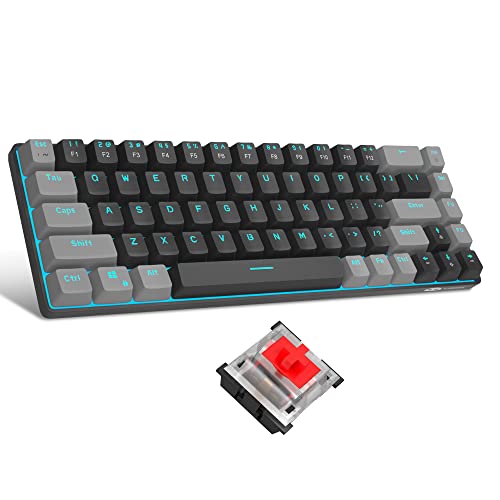
< img src = “[image link]” alt = “Red mechanical switch” />
Red switches are often lauded for their light and linear keystrokes, providing a subtle and swift typing experience.
These switches operate without the ‘click’ that characterizes most mechanical keyboards – a distinguishing factor that has earned them the epithet of ‘silent runners.’ This quiet characteristic makes them a popular choice amongst professionals who work in shared spaces or late-night gamers that need to keep their nightly escapades noiseless.
But bear in mind that ‘silent’ does not mean ‘easy.’ The lack of tactile feedback sometimes leads typos or double keystrokes, as you may not realize when a keypress is registered.

Understanding the Mechanism of Red Switches
To fully appreciate the uniqueness of the Red switches, it’s important to understand their inner workings.
At the heart of each key lies a spring-loaded mechanism that determines both the travel and the force required to actuate each keypress.
This mechanism is what gives the Red switch its light and linear keystroke.
The linear path offered by the Red switch allows the actuation force to remain constant from the beginning of the keystroke to its end.
Unlike a tactile switch where there’s a noticeable bump halfway through the key press, the Red switch is smooth.
This is where the ‘silent runner’ term comes into play.
The lack of tactile bump also removes the audible click sound which is a characteristic feature in many mechanical keyboards.
Preferred Choice Amongst Professionals and Gamers
The noise reduction the Red switch offers makes it a go-to choice for many professionals.
In shared working environments, the incessant ‘clicking’ of a mechanical keyboard can be a disturbance.
By eliminating that noise, the Red switch allows for focus and concentration, essential for productive work.
Likewise, late-night gamers would find Red switches extremely valuable.
The seamless and quiet operation ensures that their gaming sessions, no matter how intense or lengthy, don’t disrupt those around them.
Dealing with Potential Drawbacks
However, the silent operation of Red switches isn’t without its pitfalls.
For one, users who are accustomed to the tactile feedback usually common with mechanical keyboards may find it challenging to adjust to the Red switch’s smooth keystroke.
Since there’s no clear indication of when the key is actuated, users might unintentionally press keys twice, commonly known as double keystrokes, or miss keypresses altogether.
This may lead to more typos, which can be detrimental, particularly to professions that heavily rely on accurate typing, like coders, writers, and data entry clerks.
The transition to Red switches may involve a few hiccups, but many users report that they eventually grow accustomed to the feedback-less typing experience provided by these silent runners.
In conclusion, Red switches, with their unique noiseless feature, offer a significant advantage in shared spaces and during silent hours.
However, they might not be for everyone, particularly those who require tactile feedback to confirm their keystrokes.
The trade-off between silence and accuracy will be a determinant factor in choosing the Red switch.
Recommended to our readers: Click here
The Blue: The Tactile Typist
< img src = “[image link]” alt = “Blue mechanical switch” />

For those who relish the distinct, satisfying ‘click’ with each press, Blue switches are just the ticket.
Recommended to our readers: Click here
They are blessed with both audio and tactile feedback, allowing typists to feel and hear exactly when a keystroke is registered.
This typically results in fewer typos, and let’s face it; there’s something undeniably satisfying about the auditory confirmation of work well done.
The Blues, however, aren’t the most popular choice for shared workspaces or the gaming community.
Their loud ‘clickiness’ can be a major distraction, whilst the keys’ weight may tire fingers during prolonged use or rapid-fire gaming scenarios.
The Unique Characteristics of Blue Switches
One of the most distinctive features of Blue switches that sets them apart from other mechanical switches is their clicky tactile feedback.
The tactile nature of these switches means they provide a slight bump when pressed down, signaling exactly when the key has been actuated.
This tactility is a boon for those who prefer to have physical feedback while typing, providing a distinct sense of precision and control.
Moreover, the auditory ‘click’ offers confirmation of each registered keystroke.
This isn’t just a form of feedback; it comes with its own sense of satisfaction, echoing the rhythm and progress of the work being carried out.
It’s for these reasons that blues are often a popular choice amongst professional typists and writers seeking a more sensory experience while they work.
Improved Typing Accuracy
Blue switches are also known for improving typing accuracy due to their distinct feature-set.
By providing both audio and tactile feedback, typists can instantly know when they have pressed the key successfully, thus eliminating the uncertainty that can lead to double-typed keys or missed keystrokes.
It’s a feature that not only aids in achieving a more pleasing and rhythmic typing experience but could also significantly minimize typographical errors.
Potential Issues with Blue Switches
Despite the conveniences the Blue switches offer, they come with notable setbacks, especially in shared workspaces and among gamers.
The high-pitched ‘clickiness’ can often be disruptive to other people in shared spaces like offices, libraries, or even at home.
Nobody wants to be the source of constant noise pollution in a quiet work environment.
For gamers, the force required to actuate Blue switches may prove too heavy for rapid keystrokes needed in fast-paced gaming scenarios.
Their ‘weight’ may lead to finger fatigue, making them less than ideal for intense, prolonged gaming sessions.
In conclusion, the enduring appeal of Blue mechanical switches lies in their ability to offer a more tactile and immersive typing experience, which many typists find invaluable.
However, the noise factor and the physical demands these switches require can sometimes overshadow their unique benefits in certain scenarios.
The Brown: The Harmonious Hybrid
< img src = “[image link]” alt = “Brown mechanical switch” />
For the uninitiated, navigating the world of mechanical switches can feel like walking a knife-edge path between the silent Red and the clack-happy Blue.
Enter the Brown switch, the harmonious middle ground that offers a balanced typing experience for typists and gamers alike.
Brown switches deliver a tactile bump with each keystroke, similar to the Blue, but without the accompanying ‘click’ sound.
This makes them a versatile choice; they’re quiet enough for office use and provide just enough feedback for efficient gaming or typo-free typing.
Understanding Mechanical Switches
From lightweight linear switches that offer a smooth and resistance-free press, to clicky, tactile ones, mechanical switches are beyond diverse in terms of feel, sound and pressure required to actuate.
They are the heart of every keyboard, standing ready to transform every finger tap into a command or paragraph of text.
But to truly appreciate the Brown switch, it’s important to first understand its primary comparison points – the Red and the Blue switches.
Red switches are designed to be silent.
They are linear switches meaning they don’t provide any tactile feedback or audible ‘click’ sound when pressed.
This makes them an excellent choice for gaming, where rapid and frequent key presses are more the norm.
In contrast, Blue switches offer a strong tactile bump and produce a distinctive ‘clicking’ sound on actuation, making them highly favored by typists for their crisp feedback, reminding one of classic typewriters.
All About The Brown Switch
Now, imagine the appealing linearity of the silent Red with the tactile feedback reminiscent of the classic Blue switch.
The amazing outcome is the Brown switch.
Essentially, Brown switches can be considered the hybrid distributor – dispensing the beneficial features of both the Red and the Blue switches in a well-composed combination.
Their key force lies somewhere in the middle, neither too lax nor too stiff, which offers a reliable, consistent typing experience.
A subtle bump manages to convey ample feedback with each keypress, without creating any disruptive noise or vibration.
Applications of the Brown Switch
The primary advantage of the Brown switch manifests in its versatility.
They are quiet enough to not be a disturbance in a shared office environment or at home.
This makes them ideal for professionals who spend long hours typing or coding.
The muted clack is less likely to create noise that could be a potential distraction for the user or those around them.
However, the advantages of the Brown switch don’t end with workspace applications.
They are equally valuable for gamers, providing just enough feedback to confirm key presses without slowing down actuation speed.
This subtly tactile feel makes it popular among gamers who require rapid response times.
Conclusion: The Brown Switch as an All-Rounder
The Brown switches seamlessly blend the audibility and tactility spectrums, becoming a safe and stable choice for those who desire the best of both worlds.
They minimize the ambiguity of the silent Red and control the audibility of the Blue – making them the perfect harmonious hybrid for versatile applications.
Whether it
Comparing Key Features
Having explored the key characteristics of Red, Blue, and Brown switches, let’s take a closer look at their distinctive features:
| Switch Type | Keystroke | Noise Level | Typing Experience |
|---|---|---|---|
| Red | Light, Linear | Low | Smooth, Swift |
| Blue | Heavy, Tactile | High | Satisfying, Tiresome (Prolonged Use) |
| Brown | Medium, Tactile | Medium | Versatile, Balanced |
Red Switches
Red switches are synonymous with a gentle touch and smooth key travels.
They are characterized by their light, linear keystroke which makes them a prime choice for gamers who need to execute rapid commands.
Due to the straight trajectory of the switch motion, the user can experience a seamless flow, promoting agility and efficiency.
Thanks to the low actuation force required, typists can minimize keystroke errors and maintain a consistent typing speed, even over prolonged periods.
Their low noise level is another appealing feature, especially for users seeking quiet, non-disruptive keyboards.
This makes Red switches ideal for shared spaces like offices or libraries, as the typing noise is not likely to disturb others.
Blue Switches
Blue switches are arguably the most tactile of all.
They require a heavier force to actuate, which often translates to a satisfying ‘click’ sound when a keystroke is successfully registered.
Some typists find this audible cue helpful, guiding their typing rhythm and confirming successful key actuations.
However, the noise level can be a downside for some, particularly in environments requiring quiet, such as workplaces or late-night gaming sessions.
Regarding the typing experience, Blue switches offer a satisfying but potentially tiring feel.
The attribute of being “tiresome” particularly comes into play after prolonged use.
This is due to the increased actuation force required, making them less optimal for extended sessions of typing or gaming compared to other switch options.
Brown Switches
Brown switches strike a middle ground between the Red and Blue switches.
They offer a medium, tactile experience that is versatile enough to appeal to a wide range of users.
The medium noise level is a blend of the Red and Blue switches’ characteristics – noticeable, but not excessively loud.
However, what truly distinguishes Brown switches is their typing experience.
They’re considered one of the most versatile choices, equally suitable for typing and gaming.
They provide a balanced level of tactile feedback, softer than Blue switches but more substantial than Red switches.
This versatility makes them a great ‘all-rounder’, giving users the best of both worlds.
Whether you’re typing up a document, programming, or gaming, Brown switches are primed to ensure a comfortable, efficient session.
Pros and Cons
Red switches are ideal for those who appreciate a light keystroke and quieter operation.
However, the lack of tactile feedback can sometimes lead to errors.
Blue switches provide an unrivalled tactile typing experience enhanced by the satisfying click sound.
However, the high noise level may be unsuitable for shared spaces, and the heavy keystroke can fatigue the fingers over long periods.

Brown switches strike a balance between the Red and Blue, providing tactile feedback without the noise.
They suit a variety of typing and gaming scenarios but might not satisfy those looking for the extreme ends of the mechanical switch experience – whisper-quiet operation or thunderous feedback.
The Delightful Lightness of Red Switches
Red switches, often referred to as linear switches, are known for their lightweight operation, characterised by a smooth and quick response.
These are a favourite among gamers who require fast reaction times.
For instance, in a high-intensity game that requires swift execution of commands, the lightweight Red Switches come up as a top choice for most professional gamers.
Conversely, the lack of a tactile bump can sometimes lead to unintentional keystrokes.
Users might accidentally press a key without even realising it – an aspect that could be a deal-breaker for those engaged in precision tasks such as programming or data entry.
The Tactile Perfection of Blue Switches
Blue switches hold the flag high for offering the most tactile feedback among mechanical switches.
Their unique ‘clicky’ sound is often associated with the typewriter, creating a sense of nostalgia among users while typing.
This sound is not just satisfying to the ears, but it also provides an audible indicator of successful keystrokes, ensuring minimal errors while typing.
The downside, though, is the elevated noise level which can be quite distracting in quiet environments or shared spaces such as libraries or offices.
Additionally, the need for a forceful keystroke to induce that click sound could lead to finger fatigue over sustained usage.
The Balanced Appeal of Brown Switches
Brown switches essentially offer the ‘middle-of-the-road’ option blending the best qualities of Red and Blue switches.
They provide a soft tactile feedback that can boost typing accuracy without generating unwanted noise.
This makes them highly suitable for a variety of applications, appealing particularly to those who tend to switch between serious gaming and committed typing sessions.
Examples include writers who are also gaming enthusiasts or programmers who double as persistent gamers.
However, the lack of uncompromised silence or a pronounced tactile click might make Brown switches feel like a compromise for the users at the extreme ends of the mechanical switch spectrum.
Each type of switch has its place, and the choice boils down to one’s unique preferences and requirements.
Understanding the subtle yet significant differences between various mechanical switches like Red, Blue and Brown can help individuals make an informed choice, elevating their overall typing or gaming experience.
Conclusion: Choosing Your Ideal Switch
Recommended to our readers: Click here
There’s a unique appeal to typing on a mechanical keyboard, feel the keys’ resistance, and hear the audible evidence of your interactions.
Whether you’re a professional typist, a dedicated gamer, or merely a connoisseur of fine keyboards, there’s a mechanical switch designed for your specific needs.
Your choice boils down to your preference: the silent and swift Red, the clicky and tactile Blue, or the versatile and balanced Brown.
Remember, the perfect mechanical keyboard isn’t just about convenience or sound, but also about the nuanced experience it provides for each keystroke.
So choose wisely, because once you step into the world of mechanical switches, there’s rarely a way back to the mundane domes and membranes of generic keyboards.
Understanding The Appeal
Keystrokes on a mechanical keyboard echo a kind of tactile satisfaction that’s hard to replicate with plastic dome or membrane keyboards.
It’s not just about the auditory feedback that comes with every press; it’s also the firm pushback of the keys that grants a sense of productivity with each interaction.
By typing on a mechanical keyboard, users establish a deeper connection with their tech tools, making even the simplest document typing feel like an engaging activity.
Take professional typists, for example.
The persistent rhythmic sounds of a mechanical keyboard can induce a state of flow, enabling them to maintain their focus over extended periods.
Gamers, on the other hand, appreciate mechanical keyboards for their prompt, high-feedback responses, enabling on-point reactions in fast-paced scenarios.
And for the enthusiasts who seek a bit of nostalgia, it brings back the days where hefty typewriters ruled the desk.
Deciphering the Colors
The particular switch – Red, Blue, or Brown – each user chooses aligns with their need for speed and desire (or lack thereof) for auditory feedback.
Red switches, colloquially known as linear switches, offer the fastest travel time with a consistent smooth keystroke, ideal for rapid-fire typists and gamers who require speed over tactile response.
Blue switches exemplify the quintessential mechanical keyboard experience – typists love the audible ‘click’ and the tactile ‘bump’ that signifies successful keystrokes, producing a typewriter-esque essence.
Meanwhile, Brown switches propose a middle ground – providing tactile feedback like the Blue, but without the loud ‘click’, making them a versatile choice for multi-purpose users.

Choosing With Purpose
When deciding between the silent Red, the audible Blue, or the versatile Brown, it’s crucial to consider more than just the simple sound—or lack thereof—that each switch may output.
Each color switch has a unique feel under the fingertips, influencing typing speed, accuracy, and ultimately, user comfort over long durations.
The best mechanical keyboard isn’t just about the speed of typing or the noise it produces; it’s about the multi-sensory experience that suits your specific needs.
It’s about finding the extension of yourself in a piece of technology.
The Mechanical Keyboard Experience
Stepping into the world of mechanical keyboards isn’t just choosing a typing device, it is opting for a completely transformed typing experience.
You’ll find the humdrum rubber domes of a generic keyboard a distant memory as you begin to appreciate the sym